
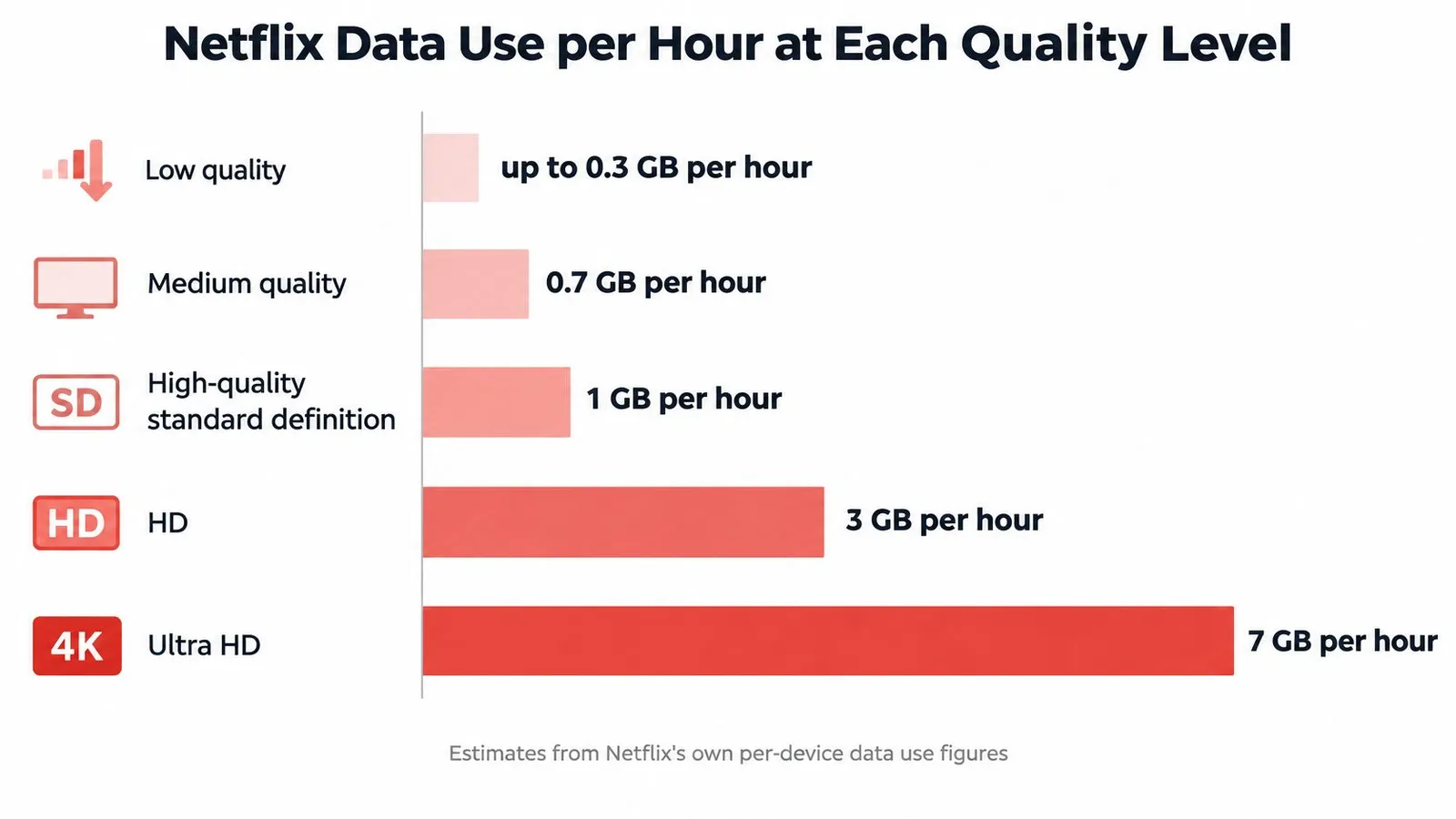
Netflix uses up to 0.3 GB per hour at Low quality, up to 0.7 GB per hour at Medium, up to 3 GB per hour in HD and up to 7 GB per hour in Ultra HD or 4K. Those are Netflix's own upper-bound estimates, measured per device and per hour of viewing.
The two ends of that range decide everything. A two-hour film costs about 0.6 GB on the Low setting and about 14 GB in 4K, which is the difference between a plan that lasts a fortnight and one that's gone before the credits roll. Answering how much data Netflix uses isn't really about the show. It's about how many hours your allowance buys at the quality your phone will stream.
Netflix Data Use per Hour at Each Quality Level
Netflix publishes per-device estimates in its Help Center, and those figures are the ceiling for every other calculation on this page. The quality setting you choose caps the bitrate, and the cap converts into gigabytes at a predictable rate.
| Playback quality | Maximum data per hour | Two-hour film |
|---|---|---|
| Low | up to 0.3 GB | about 0.6 GB |
| Medium | up to 0.7 GB | about 1.4 GB |
| High-quality standard definition | up to 1 GB | about 2 GB |
| HD | up to 3 GB | about 6 GB |
| Ultra HD or 4K | up to 7 GB | about 14 GB |
The words up to do the heavy lifting. Netflix streams adaptively, so the app picks a bitrate that fits the current connection, and each published figure is what the top of that setting can cost when the network allows it. A busy cell tower or a throttled hotel network will often come in below the ceiling. A strong signal and an idle phone will sit right at it.
Here's how the five ceilings look when they're lined up against each other:
Where the gigabytes actually come from
Video is encoded at a bitrate, which is the number of bits sent each second to hold the picture and the sound. Every extra bit is data your plan pays for. Higher resolution needs more of them, HDR needs more again, and a fast-moving action scene needs more than a static interview because more of the frame changes from one frame to the next.
That's why two people on identical plans, watching the same title, report wildly different usage. One is on a phone locked to a low setting; the other is on a tablet that negotiated 1080p without telling anyone. Content, device and connection all push the number around within the published range.
The quality setting is the one variable a traveler fully controls. Everything else on that list belongs to the network.
Netflix isn't the only service with published numbers, and a trip usually involves more than one app. Travelers juggling several subscriptions can browse video streaming figures to see how the major platforms compare per hour before deciding where to spend the allowance.
Before pressing play, open the playback settings and check what's selected. That one screen decides whether a trip's data is measured in tens of viewing hours or in minutes.
How Far a 5 GB, 10 GB or 20 GB Plan Goes
The useful question isn't how much data Netflix uses per hour. It's how long a specific plan lasts, and that answer changes by a factor of twenty depending on which quality row you read.
Take a 5 GB plan, the size most short trips start with. At Low quality it covers about 17 hours of viewing, roughly two hours a night for an eight-day trip. At Medium it falls to about 7 hours. In HD it's about 1 hour 40 minutes, barely longer than one film, and in 4K it's about 43 minutes.
| Plan size | Low (up to 0.3 GB/h) | Medium (up to 0.7 GB/h) | HD (up to 3 GB/h) | 4K (up to 7 GB/h) |
|---|---|---|---|---|
| 1 GB | about 3.3 hours | about 1.4 hours | about 20 minutes | about 9 minutes |
| 5 GB | about 17 hours | about 7 hours | about 1 hour 40 minutes | about 43 minutes |
| 10 GB | about 33 hours | about 14 hours | about 3.3 hours | about 1.4 hours |
| 20 GB | about 67 hours | about 29 hours | about 6.7 hours | about 2 hours 50 minutes |
Find your plan size in the first column, then read across to the quality you'll realistically use. Moving down a single quality row costs you most of your viewing time. Moving from Low to 4K costs almost all of it.
Three things shrink those figures in practice. A shared hotspot counts every connected device against the same allowance, so a laptop pulling an update eats the hours a phone was going to watch. Auto mode can raise quality on a strong signal without asking. And app updates, photo backups and autoplay trailers spend data in the background whether or not anything is on screen.
Plan for the messy case: if you can't predict your viewing, read the HD row rather than the Low row. It leaves room for the map at the station, the messages at dinner and the phone's own background traffic.
Prices for those allowances swing widely by destination and provider. Comparing eSIM prices by destination before departure shows what a gigabyte costs where you're going, which often matters more than shaving a gigabyte off the estimate.
What 480p, 720p and 1080p Cost in Data
Netflix's four labels hide a spread of resolutions, and the bitrate behind each one is what actually spends the allowance. Independent bitrate analysis compiled by How-To Geek puts concrete figures on each tier.
| Resolution | Typical bitrate | Data per hour |
|---|---|---|
| 480p | about 1,750 kbps | roughly 792 MB |
| 720p | about 3,000 kbps | about 1.3 GB |
| 1080p | 4,300 to 5,800 kbps | about 1.9 to 2.55 GB |
| 4K | 8,000 to 16,000 kbps | about 3.5 to 7 GB |
Each additional bit carries encoded video and audio. Higher resolution, HDR and fast scene motion all need more of them to hold their perceived quality, which is why the 1080p row alone spans a range wider than the entire jump from 480p to 720p.
Translated onto a 20 GB allowance, those ranges give roughly 25 hours at 480p, 15 hours at 720p, 8 to 10 hours at 1080p and 3 to 6 hours in 4K. The uncertainty inside each range comes from the title itself.
This explains why two people report different numbers for the same show. A phone carrying an HD label frequently streams at 720p rather than 1080p, so a "HD" estimate can be off by a gigabyte an hour in either direction. A tablet or a TV sharing the hotspot pushes every range towards its top end.
If the picture keeps dropping to a lower tier on its own, a congested cell is usually the cause, and fixes for slow data speeds cover what to check before blaming the stream.
Match the resolution to the screen. On a six-inch phone, 480p at 792 MB per hour is watchable and spends less than half what 1080p would.
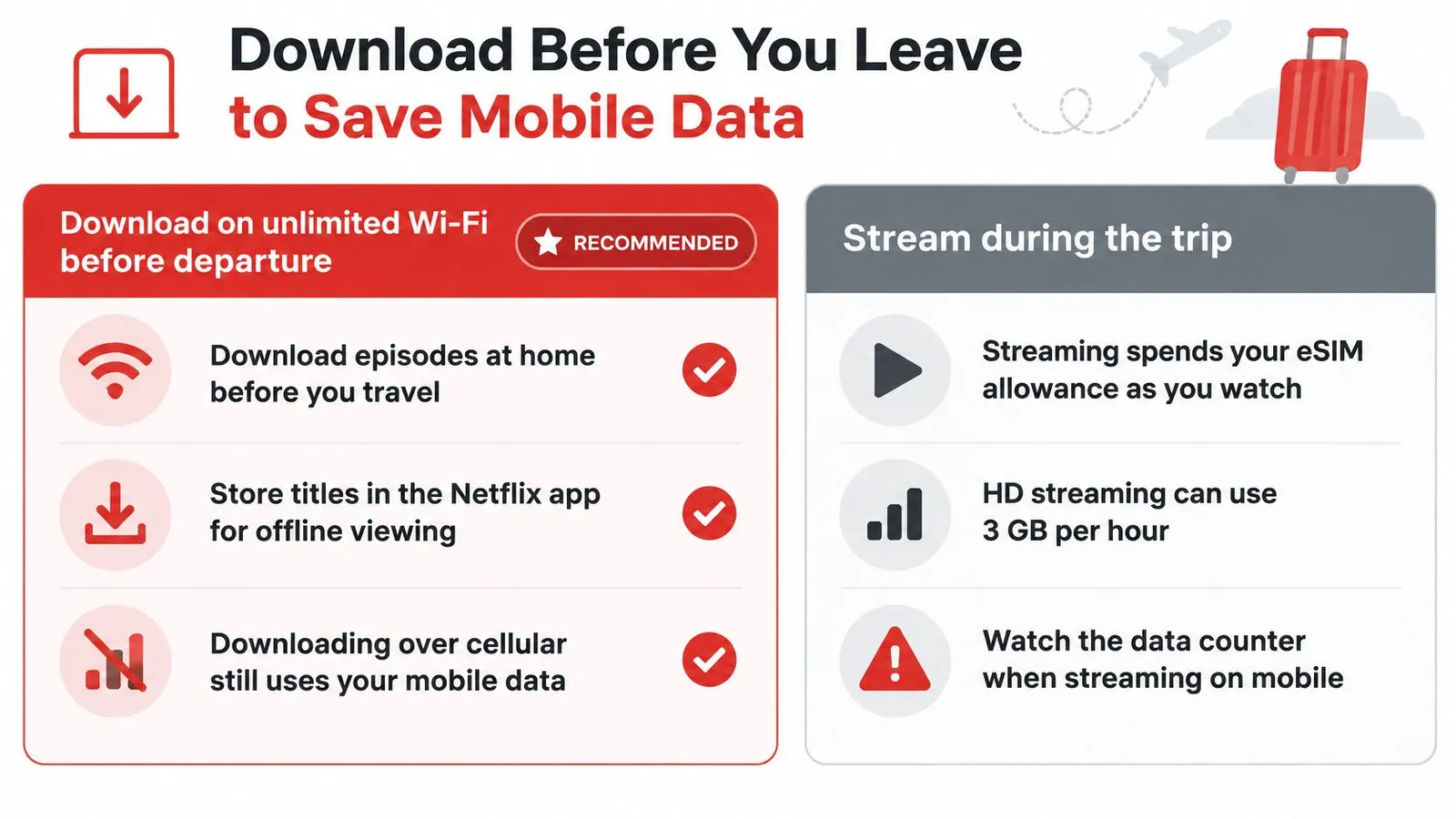
Download Before You Leave to Save Mobile Data
There are two ways to watch on a trip, and only one keeps the allowance intact. Either the episodes are already sitting on the phone before departure, or they stream live and bill the eSIM as they play. Netflix's offline feature lets downloaded shows and films play with no connection at all, and Netflix recommends downloading over Wi-Fi specifically to save mobile data.
The trap is downloading over cellular after arrival. That transfer carries the full weight of the file, so it spends roughly the same data that streaming the title once would have. A download doesn't make a video free. It moves the cost to a moment you choose, ideally a moment on someone else's unlimited connection.
The trade-off is easier to see laid out side by side:
The download cap that catches families out
Offline viewing has a hard ceiling that most guides skip. Per Netflix's downloads help page, ad-supported plans allow 15 downloads per device per calendar month, while ad-free plans allow up to 100 active downloads per device, depending on how many devices the plan includes. A family loading four phones before a two-week trip is counting against four separate device limits, not one shared pool.
A five-step routine for the night before
- Connect to unlimited home Wi-Fi first. The whole point is to spend someone else's data, and a phone that's still on cellular will bill the download to the eSIM.
- Download only the titles that would hurt to lose. Flights, train legs and the first two evenings are the moments worth covering; everything else can wait for hotel Wi-Fi.
- Open the Downloads section and confirm each title appears. A queued download that never finished looks identical to a finished one until you're airborne with no signal.
- Count the downloads against your plan's device limit. Fifteen on an ad-supported plan disappears fast across a series and a couple of films.
- Reserve mobile data for the unplanned. The show someone recommends at dinner is exactly what the eSIM allowance is for.
If this is the first trip with a travel eSIM, what an eSIM is and how it installs covers the setup, so the download routine doesn't become a scramble at the arrivals gate.
Settings and Habits That Keep Netflix Within Your Allowance
On a phone, Netflix doesn't run on the browser figures at all. The app carries its own per-device mobile data settings, and they shift the arithmetic more than any other control available. Netflix's documentation of mobile data usage settings describes three behaviours.
| Setting | How it selects quality | Approximate viewing per GB |
|---|---|---|
| Automatic | Adjusts quality to the connection | about 4 hours |
| Save Data | Keeps quality lower to use less data | about 6 hours |
| Maximum Data | Uses the highest quality the device and title allow | Not fixed |
Read the middle column as a promise and the last row as a warning. Automatic is the default, and a gigabyte buys about 4 hours under it. Save Data stretches the same gigabyte to about 6 hours. Maximum Data takes the best quality the device and the title will support, so its total depends entirely on what's playing and how good the signal is.
A 5 GB plan therefore covers roughly 20 hours on Automatic or 30 hours on Save Data, before the phone's own activity, app updates, hotspot sharing or an unstable network takes its cut. That's an entire extra evening of viewing from one toggle.
Automatic isn't a safe default either. It raises resolution when bandwidth allows, so the same setting can be frugal on a weak hotel network and expensive on a strong one.
Why the scale argument matters to one traveler
An academic study of Netflix playback reported that Netflix had claimed approximately 2 billion hours of video streamed from its servers each month, which works out to about 66.7 million viewing hours a day (ACM Digital Library). The study examined network bandwidth, processor use and energy consumption during playback, not just data.
At that scale, a small per-hour difference multiplies into an enormous volume, and the same logic runs in miniature on a travel plan. Saving two gigabytes an hour is trivial for Netflix and decisive for a 10 GB eSIM.
Five habits that hold up on the road
- Turn off automatic downloads and app updates over mobile data. These run at the worst moment, unattended, and can consume more than the evening's viewing.
- Check the phone's data meter each evening against the days left. A meter read daily turns a surprise into a decision; a meter read on the last day turns it into a bill.
- Use hotel or café Wi-Fi for long episodes. Save the cellular allowance for transit, where no other network exists.
- Top up before the allowance runs out. Running to zero mid-trip means hunting for a connection to buy more, and coverage by destination shows what's available where you're standing.
- Count every device on the hotspot. A tablet streaming beside a phone draws from the same total, and neither device shows the other's usage.
One limit is worth knowing in advance. RedSim's Fair Usage Policy lowers speed to 1 Mbps after 3 GB of usage per day, so a heavy streaming session on an unlimited plan will start to stutter once that threshold passes. Three gigabytes is about one hour of HD viewing, or around ten hours on the Low setting.
Choose Your Plan Size Before You Travel
Estimating is a three-step calculation, and it takes about five minutes. Estimate the hours you'll watch each day, multiply by the hourly rate for the quality you use, then add a buffer for maps, messages and the hotspot.
A worked example makes it concrete. Say a traveler watches one hour a night for a week at Medium quality. Seven hours at 0.7 GB comes to about 4.9 GB, so a 5 GB plan covers the viewing with almost nothing left over. A 10 GB plan covers the same week and leaves real headroom for everything else the phone does.
RedSim's North America pricing shows how the options stack up. The 1 GB plan for 7 days costs $3.38, the 5 GB plan for 30 days costs $13.52, the 10 GB plan for 30 days costs $20.02, and unlimited data for 7 days costs $21.42. Notice that doubling from 5 GB to 10 GB adds less than $7, while the jump to unlimited costs more than the 10 GB plan itself.
Unlimited plans charge one price for unlimited data during the plan's validity, and some slow down after very heavy daily use under a fair-use policy. That makes them a strong fit for a short trip of maps, messages and a couple of episodes, and a weak fit for someone planning to stream HD every night of a two-week stay.
Pick by trip shape. A city break with one evening of viewing fits 1 GB. A week of nightly episodes fits 5 GB. Anything involving a hotspot, a tablet or a work laptop belongs at 10 GB or above.
If the choice still feels close, choosing the right plan walks through the trade-offs between duration and allowance. Set the daily hours, choose the quality, multiply, then buy the plan that handles the total with room to spare.
RedSim offers travel eSIM data plans for more than 200 destinations. Its app tracks usage in real time, so the Netflix hours you've budgeted stay visible as you use them. Plans arrive instantly by QR code or install with one tap, and any eSIM you haven't installed or activated is refunded in full. Estimate your viewing hours first, then choose the allowance that fits them at RedSim.