
 Taiwan

Taiwan welcomed 8,574,547 international visitors in 2025, a 9.12% increase on 2024, according to the Tourism Administration's 2025 arrivals data. In the first hour after landing, a map, a message to whoever is meeting you, and a ride-hailing app all have to work.
The buying guides I checked lead with a 5G badge and a peak speed number. That badge does not tell you whether your phone will hold a signal on the coastal road south of Hualien, on the underground platforms of Taipei Main Station, or at 11pm in a Tainan alley where the restaurant you booked has no Wi-Fi.
Coverage follows the host network the plan rides on.
I rank Taiwan eSIMs by that network, by how long you're staying, and by whether you need a Taiwan phone number. Get those three right and price gaps become a secondary choice, because the itinerary decides where you will have signal.
Pick the Right Taiwan eSIM for Your Trip
The average inbound visitor stayed 6.98 nights in Taiwan in 2024, according to the Tourism Administration's 2024 tourism snapshot. For a stay around a week, a short-validity plan is usually a closer fit than paying for a longer one. Extend the allowance or validity if your itinerary runs longer or you expect heavy data use.
Arrival logistics also affect the choice. In December 2024, 94.72% of arrivals entered by air and 78.65% passed through Taoyuan Airport, the same snapshot reports. Installing an eSIM before departure avoids having to shop at an airport counter after landing.
Install the plan at home over Wi-Fi, then connect when you arrive.
These five options suit different routes and needs. The order reflects where each fits, not its advertised speed.
Taiwan connectivity options compared
| Option | Best for | Starting price | Taiwan phone number |
|---|---|---|---|
| Taiwan eSIM | Taiwan-only trips of 3 to 30 days | From $3.39 (1 GB, 7 days) | Usually no |
| Global eSIM | Trips that cross several borders | From $6.15 (1 GB, 7 days) | Usually no |
| Regional eSIM | Multi-country routes within one region | From $2.89 (1 GB, 7 days, Asia) | Usually no |
| Local prepaid SIM | Long stays that need a local number | Set by the carrier's airport counter rate | Yes |
| Home carrier roaming | Very short trips where cost does not matter | Charged per day by your own carrier | Yes |
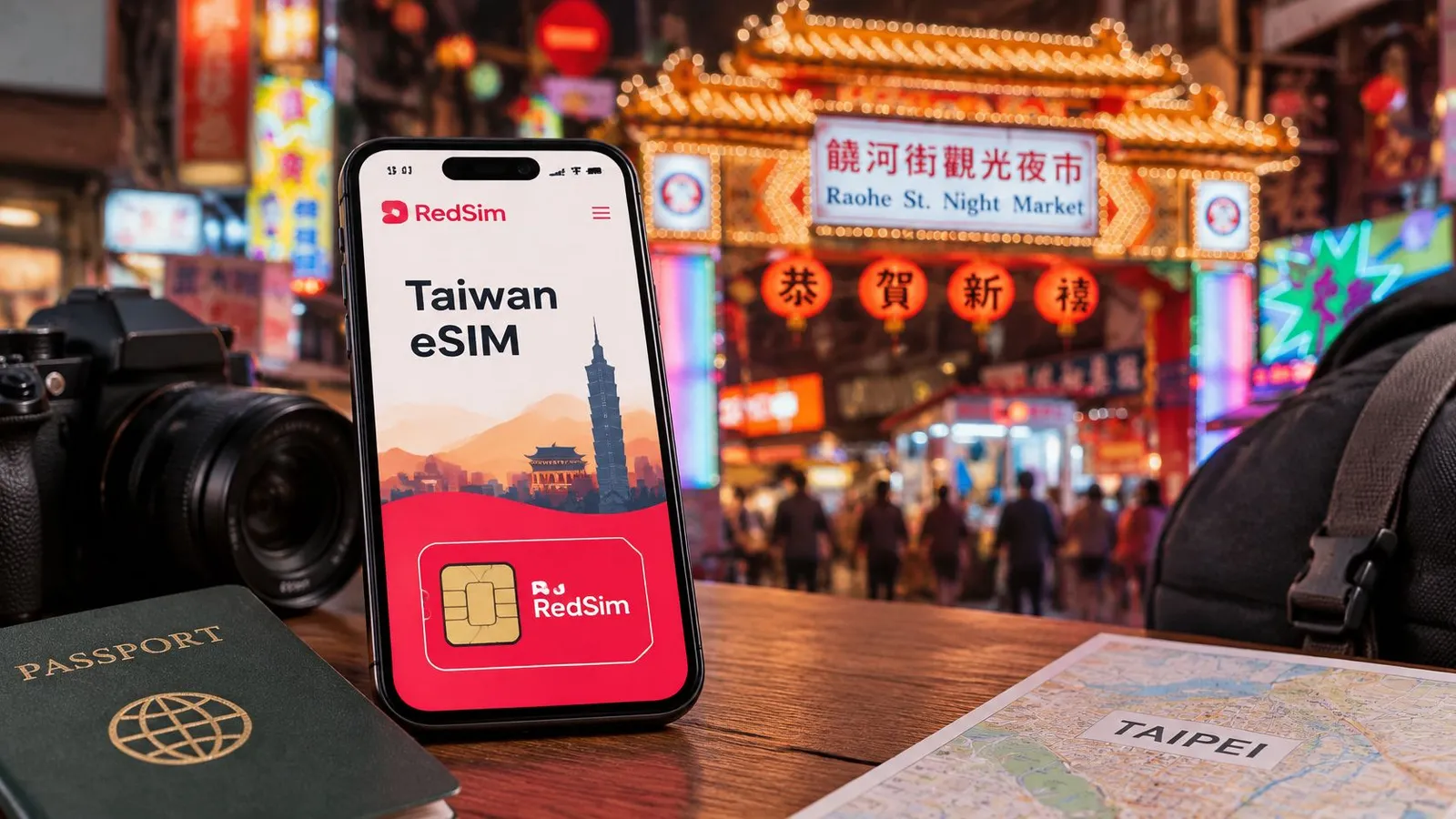
For a Taiwan-only trip, a country eSIM keeps the purchase simple: one plan for the destination, with no per-day billing. RedSim lists its Taiwan plan at $3.39 for 1 GB over 7 days. Its Global plan costs $6.15 for the same allowance, a practical option if Taiwan is one stop on a wider itinerary.
Regional plans suit routes that stay within a part of the world. RedSim offers regional eSIMs for Asia, Europe & UK, the Middle East, North America, South America and Africa, as well as a Global plan. A Taipei, Hong Kong and Tokyo itinerary can use one regional option rather than separate country purchases. For a comparison of marketplace catalog breadth and support, see this assessment of Airalo as a travel service.
The local prepaid SIM is the fit when a Taiwan number matters. Home-carrier roaming offers the convenience of keeping your existing number, but daily billing can add up even when you use little data. Choose according to your route, expected data use and need for local calls or texts.
Choosing Between an eSIM and a Local SIM
A late landing at Taoyuan, with a transfer still to make, is the case that settles this for me. You either want data the moment the cabin door opens, or you want a Taiwan number you can give a restaurant, a driver, or an app that will only send a code by SMS. Those are different purchases.
A local prepaid line is bought at a counter after you land. The Bento guide to Taiwan SIM cards says a traveler may need a passport and, depending on the sales channel and the operator, a second identity document. That is a queue, then paperwork, then a physical SIM in the tray. An eSIM is paid for online and installed before departure, so the profile is already on the phone when you land and the counter stop never happens. What an eSIM is covers how that profile sits next to your home line.
Skip the counter and you also skip the number. A travel data plan does not hand you a Taiwan mobile number, local SMS, or a verification text for a service that insists on one. Registration attaches to the local subscriber line. The handset does not need a separate permit before it can use mobile data.
Split the buy this way:
- Choose an eSIM if the trip runs on maps, messaging and browsing, you land late or with a connection to make, or a family needs data on several phones as soon as the plane parks.
- Choose a local prepaid SIM if you need a number for reservations, taxi dispatch, delivery apps or account checks, or the stay is long enough that a counter visit costs you little time.
- Choose both if you need the number and the early data. Run the eSIM for data and leave the home line on for calls and texts. Dual-SIM phones are built for that split.
RedSim's Taiwan eSIM is a data plan, delivered as a QR code, with durations up to 30 days, from $3.39 for 1 GB over 7 days. It does not stand in for a local number. If a booking or a delivery app fails without one, take the prepaid SIM for the number and keep the eSIM for data. If the whole trip is maps and chat, the counter visit buys a feature you will not use.
Decide before you book the fare. The choice changes which product you carry, not only the price on the receipt.
Why Network Coverage Beats the 5G Label
Taiwan had about 19.69 million 4G accounts and more than 10 million 5G accounts, or 33.7% of telecommunications accounts, by the end of November 2024, according to Taipei Times reporting on the Taiwan mobile market. That matters on a trip: 4G remains a substantial part of the network you will use for navigation, messaging and ride-hailing.
A 5G badge shows what a plan may support, not how consistently you will have signal. The Taiwanese operator behind the eSIM determines its coverage and handoffs. For an itinerary beyond the main cities, that distinction matters more than the maximum speed printed on the plan.
What the three host networks actually deliver
Ookla's H2 2024 Taiwan report found 5G reach across 83% of measured locations for Chunghwa Telecom, compared with 71.6% for Taiwan Mobile and 69.8% for FarEasTone. Chunghwa's median 5G download was 346.2 Mbps, with upload at 34.46 Mbps and latency at 23 ms, according to Ookla's Taiwan connectivity report.
Taiwan host network coverage and performance
| Network | 5G reach (H2 2024) | Median 5G download |
|---|---|---|
| Chunghwa Telecom | 83% | 346.2 Mbps |
| Taiwan Mobile | 71.6% | Not published |
| FarEasTone | 69.8% | Not published |
For a city itinerary, any of these hosts may be a reasonable choice. A trip along the east coast, into Taroko or across a mountain highway puts more weight on reach than peak download speed. The reported reach figures favor Chunghwa, but they do not guarantee a signal at every stop.
How to read a plan's network line
Check whether the plan names its Taiwanese host operator or says it automatically selects among local networks. A 5G label alone does not tell you which network carries the connection, or whether you can switch hosts when coverage drops. If the network information is vague, treat that uncertainty as a trade-off, especially for a route with rural or mountain stops.
For Taipei, Taichung and Kaohsiung, speed may matter more for video calls and downloads. For travel outside those cities, prioritize a named host or automatic network selection over the 5G badge. That is the practical ranking: choose by where you need signal, then compare speed.
Sizing Your Data, Validity and Hotspot Use
Take a six-night trip based in Taipei with a day out to Jiufen. Maps, translation, messaging, a few photos and short calls fit inside 1 GB, because none of those tasks is bandwidth-hungry. Change one variable, a laptop joined to the phone for video meetings and an operating-system update, and the same trip can pass 5 GB without anything resembling overuse.
Speed is rarely what limits you. Opensignal's June 2025 Taiwan report, drawing on Ookla's first-half 2024 measurements, put Chunghwa's median download at 119.07 Mbps, against 65.94 Mbps for FarEasTone and 65.50 Mbps for Taiwan Mobile (Opensignal's Taiwan mobile network experience report). At those rates the constraint is the allowance you bought, not the radio behind it.
For business travelers and remote workers, the binding question is tethering. A fast connection you cannot share with a laptop is the wrong purchase, whatever the speed test says.
Four checks before you buy
- Confirm hotspot is allowed. If sharing is blocked, or tethered traffic is deprioritized, the allowance stays stranded on the phone.
- Round the allowance up, not down. Between two tiers, take the larger one; a little unused data is easier to absorb than a mid-trip top-up on the day your map stops loading.
- Set validity to cover arrival through departure plus a day. A delayed flight should not leave you offline on the day you need a map most.
- Plan to top up the same eSIM rather than buy a second. A top-up keeps the existing profile, while a second purchase means a second QR code and a second install.
Estimating is arithmetic: daily use multiplied by nights, plus a laptop allowance for each working day. I would weight the working days in that calculation, since one tethered afternoon can outweigh several days of maps and messaging.
Rule of thumb: if a laptop will be open for more than one day, buy the next size up and confirm tethering before you pay.
If the tiers blur together, this walkthrough of choosing the right plan cross-checks the numbers against your own estimate. For a route that crosses several borders, the Global eSIM lasts up to 30 days, switches networks without a SIM swap, and removes the per-country purchase entirely.
How to Check Your Phone and Install Your eSIM
Two conditions decide whether an eSIM is even an option for you, and both are checkable at home in a couple of minutes.
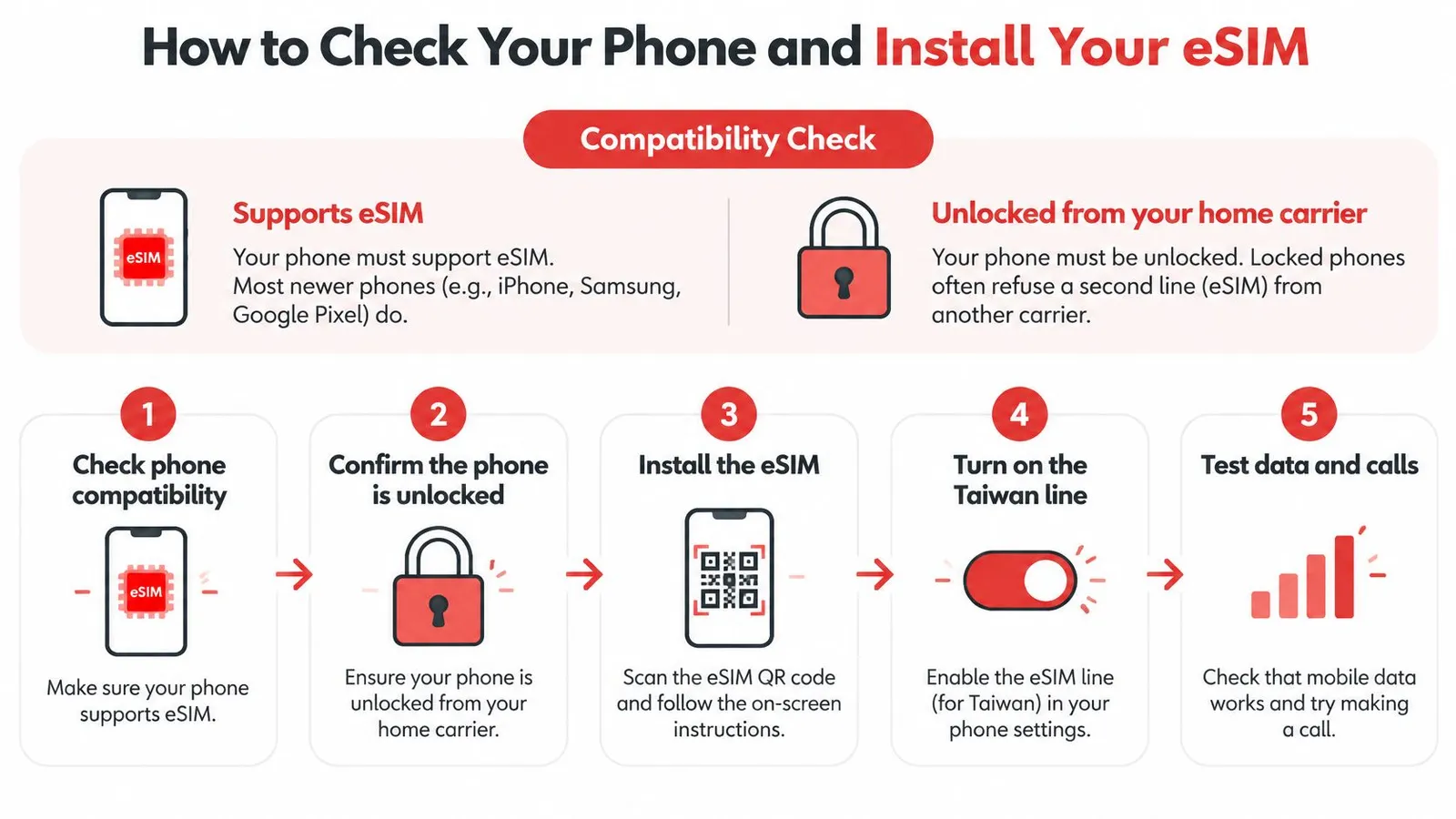
Check compatibility and lock status first
Open the phone's cellular settings and look for an Add eSIM or Add Mobile Plan entry. If it's there, the hardware supports eSIM. The device compatibility list covers the common handsets, though the phone in your hand is the definitive answer.
The second condition catches more people. A phone sold locked to a carrier, or still under an instalment plan, will refuse a second profile no matter how cleanly you install it. Confirm that your phone is no longer carrier-locked with your home carrier before you travel, not at the gate.
The install routine, in order
- Buy the plan before you pack. The QR code arrives by email within minutes, and buying early usually costs nothing because validity starts when the profile first connects to a network in Taiwan, not at checkout.
- Install over home Wi-Fi. The profile downloads over an internet connection, so doing it in an arrivals hall means hunting a captive Wi-Fi portal while jet-lagged.
- Scan the QR code from the Add eSIM screen, or use 1-click installation in the app on compatible devices, which takes about two minutes. Keep the confirmation email for the whole trip.
- Label the new line Taiwan and set your home line as the default for calls and texts. The label is what stops you switching the wrong line six days later.
- Leave the Taiwan line switched off until you land. This is the slip that costs money: activating at home can burn allowance and start the validity clock before you've left the country.
- On landing, switch the Taiwan line on and allow data roaming for that line only, then set it as the mobile data line. Roaming on a travel profile is normal; roaming on your home line is billed at home rates.
- Load a map or a web page to confirm. That's the whole test.
The sign of a clean setup is narrow and specific: a second line appears in settings, mobile data points at it, a page loads, and the home line still receives a text. If the phone fails the compatibility or network access check, skip all of this and take the local prepaid SIM or your home carrier's roaming option from the first table.
Fixing Common eSIM Problems in Taiwan
The failures that surface after landing are usually settings, and settings are fixable from a hotel lobby.
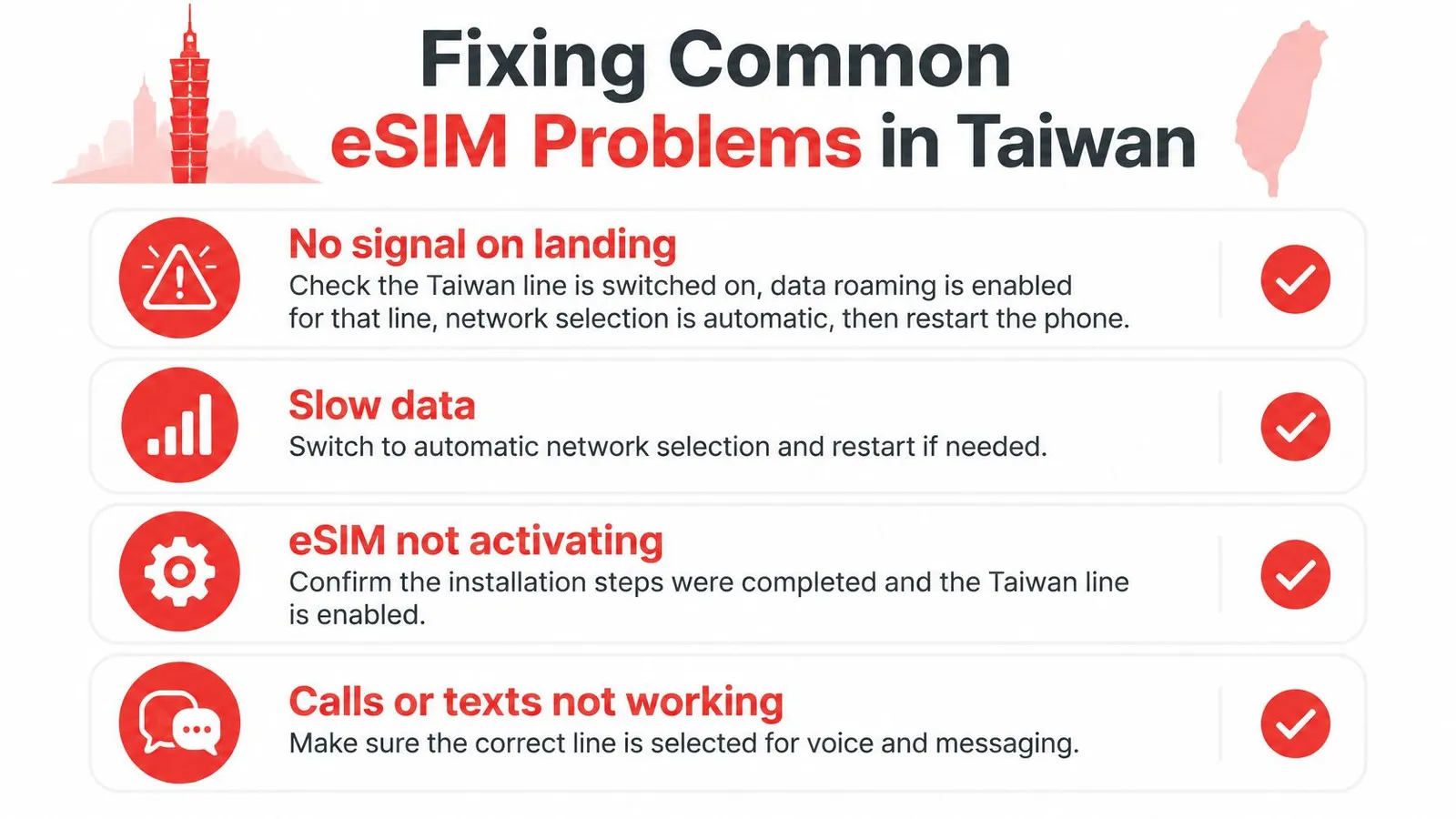
The most common one is nothing at all after touchdown. Work through it in order: confirm the Taiwan line is switched on, enable data roaming for that line, set network selection to automatic, then restart the phone. The test is a page loading in a browser, not the carrier name appearing in the status bar. If it still fails, the no signal after landing walkthrough covers the remaining causes, including APN entries.
Slow data in the hills or on a highway between cities usually comes down to which network the phone is holding. Leave network selection on automatic so the phone can drop to 4G and pick up another host rather than clinging to a weak 5G cell. A plan limited to one host has nowhere to fall back to, which is why the network question comes before the speed question.
When a hotspot refuses to share, check the tethering terms on the plan before assuming a hardware fault. Some plans allow it and some don't, and the phone itself is rarely the problem.
An allowance that empties faster than expected usually means background work running on the wrong line. Check per-app data usage in settings first, since a single sync or auto-update can burn through a small plan overnight. If the plan itself was undersized for the trip, the Sizing section above covers how to pick a data amount that matches it.
Keep a spare QR code unscanned if the itinerary might change. An eSIM that was never installed is refundable in full.
When a setting can't be found on the road, chat beats a help page. RedSim runs WhatsApp and email support 24/7 with typical replies of about two minutes, which matters most in the first hour after landing.
Confirm Your Taiwan eSIM Before You Fly
A five-day Taipei stay that grows by two nights in Kaohsiung is a different purchase from a ticket that continues into Japan. The plan you bought for the first version of the trip is what you should reopen before you fly, not the phone settings you already settled.
Stay inside Taiwan and the country plan still matches the route. Cross a border and a Global plan is the structure that keeps one profile working on both sides of that flight. Whether you need a Taiwan number does not follow the map: a data plan answers coverage and allowance, not local calls or texts, so that choice stays separate from how many cities you add.
The clock is the part people misread. Validity on most travel plans begins at the first connection on a local network, not at purchase, and this explanation of when a plan starts covers how that first connection is counted. Buy on Monday, land on Friday, and the unused days are not already gone.
I would freeze the route, then install. Compatibility, data size, and hotspot rules are already handled earlier in this guide.
RedSim covers more than 200 destinations with prepaid eSIM data, from a Taiwan-only plan to a Global plan for routes that cross several borders, delivered by QR code or 1-click installation in the app, with 24/7 WhatsApp support and full refunds on any eSIM that hasn't been installed. Decide the trip length and whether you need a local number, then pick the plan that matches those two answers. Start at RedSim and have the profile installed before you pack.

 Australia

 Japan