
 Canada
The advice you'll read most often about a Canada eSIM is to buy the cheapest plan with the largest data bucket and the fastest 5G badge next to it. That advice is easy to follow and easy to regret a week later. It says nothing about which network carries your phone across the Rockies, nothing about whether the plan drops back to LTE when 5G disappears, and nothing about the SMS code your hotel sends at check-in.
Canada widens that gap more than most destinations. The population is clustered in a handful of metro areas, so a strong experience in Toronto or Vancouver tells you almost nothing about a highway pullout two hours north of Lake Louise. A plan that wins a city-based comparison table can lose badly on a road trip.
The working rule here is route-first. Judge the best eSIM for Canada by the itinerary you'll travel, the data you realistically burn in a day, and whether you need a working number for calls and texts. Price comes after those three.
Quick Picks for Canada at a Glance
Three plan shapes cover almost every Canada trip. The table shows what each one is for and the single item to verify before paying.
Canada eSIM plan types at a glance
| Option | Best for | Coverage | Check before buying |
|---|---|---|---|
| Canada country eSIM | Trips that stay in Canada | Canada only | Network partners and LTE fallback |
| North America regional eSIM | Trips that also cross into the US or other North American countries | Several countries | Which countries are included and how data is shared |
| Global eSIM | Trips across several continents | Multiple continents | Whether Canada runs on a local partner network |
For visitors traveling to Canada alone for one to four weeks, a Canada country eSIM with at least 5 GB covers messaging, maps, translation and the occasional video call, and a plan that allows hotspot sharing handles a laptop in the evening. RedSim's Canada eSIM starts at $2.63 for the smallest data tier, a size that suits a long weekend far better than a month of remote work.
Borders change the answer. If the itinerary touches the United States, whether that's a Seattle day trip from Vancouver, a bus through New England or a positioning flight via a US hub, a North America regional eSIM keeps one plan running and removes the need for a second purchase mid-trip. Trips spanning several continents need a global plan, where the check is whether Canada is served through a local partner network.
Atlantic Canada adds a planning wrinkle worth naming. Sightseeing and connectivity are separate problems, and travelers building a Cabot Trail loop can plan the driving days first with the Approved Experiences Traveler Nova Scotia guide, then size data around how much of the route sits between towns.
One check catches most surprises: open the provider's coverage map and zoom into the exact stretch you will drive, down to the level of a single highway pullout on the Icefields Parkway between Banff and Jasper. A country-level shaded map can hide the one gap that ruins the drive.
How Much Data a Canada Trip Needs
Start with the allowance, then work backward to the trip. The four North America plans below also cover Canada, so the same arithmetic works for a Canada-only itinerary and a cross-border one.
North America eSIM data allowances and prices
| Plan | Data | Duration | Price | Best fit |
|---|---|---|---|---|
| North America 1 GB | 1 GB | 7 days | $3.38 | Light use: messaging and maps |
| North America 5 GB | 5 GB | 30 days | $13.52 | A month of navigation, messaging and occasional video calls |
| North America 10 GB | 10 GB | 30 days | $20.02 | Remote work with daily calls and laptop tethering |
| North America unlimited | Unlimited | 7 days | $21.42 | Heavy use over a short trip |
The sizing rule that beats guesswork
Estimate daily use by activity rather than by gut feel. Messaging, map searches and a handful of photo uploads stay light. Video calls, cloud photo sync, social video feeds and laptop tethering run heavy, and the heavy tasks stack: a laptop tethered for a two-hour video call on a driving day can outdraw several days of navigation. The trap is that home habits sit behind home Wi-Fi, so the phone's own usage counter is a better starting point than memory.
The CRTC's communications monitoring report found that among Canadian subscribers with data plans, average data consumption more than doubled between 2020 and 2024, with compound annual growth exceeding 24% over that period. Those are residents who know the network, which shows how quickly real use outruns a guess.
Matching each size to a trip
- 1 GB for 7 days at $3.38: a city break where the hotel and cafés carry most of the load, with data for maps and messages on the move.
- 5 GB for 30 days at $13.52: the default for a month of ordinary travel, with enough headroom for navigation on long drives.
- 10 GB for 30 days at $20.02: remote work, daily video calls, cloud backups and hotspot use for a second device.
- Unlimited for 7 days at $21.42: one heavy week, such as a family sharing a connection or a stretch of streaming and uploads.
Buy about 30 percent more than the estimate. For a short, light trip, a top-up costs less than an unlimited plan bought up front and never used, and a top-up goes on the active eSIM without a new QR code. Three days in, compare the in-app usage tracker against the plan total and decide whether to add data, rather than finding the shortfall at the end of a driving day.
The table above lists North America plans, which include Canada. A traveler staying inside the country can compare against the Canada eSIM, which offers prepaid data plans with durations up to 30 days and instant delivery by email with a QR code.
Coverage Outside Major Cities and Highways
National averages are the wrong lens, but they set a useful floor. Statistics Canada reports that in 2024, 99.5% of Canadians had access to LTE networks, while 94.3% had access to 5G (Statistics Canada). LTE is the baseline a travel plan must support. 5G is a bonus.
Those figures are measured by population, not by land area. That distinction decides real trips. A plan that works well in Toronto, Vancouver, Montréal, Calgary or Ottawa can thin out on a highway through the Rockies, in a northern community or inside a national park. Run three checks before buying:
- LTE fallback: confirm the plan drops to LTE rather than going dark when 5G isn't there.
- Partner networks: find out which Canadian carriers the plan uses, and whether it can move between them.
- Hotspot policy: check the tethering rules if a laptop, tablet or second phone travels with you.
What each itinerary type really needs
City-only trips are the easy case. Downtown cores, airports and transit corridors carry strong service, so a modest allowance and any major carrier work. The worthwhile habit is downloading the city map for offline use anyway, because underground transit and thick-walled buildings still create gaps.
Mixed city and highway trips are where planning pays. Service holds along most major corridors but weakens between towns, and the stretches in mountain parks are patchier than the roadside signs imply. Download offline maps for each driving day while still on Wi-Fi, and note fuel and rest stops as much as signal.
Remote trips need honesty about physics. Northern routes, deep backcountry and park trails outside town can have no terrestrial coverage at all, and an eSIM can't create service where no network exists. Travelers basing themselves near Yoho can match Field and Golden hotel stays to the driving legs, then treat connectivity as a town stop rather than a guarantee on the road.
The question worth putting to any provider is short: which network carries my route, and does the plan fall back to LTE outside the cities?
Network Speed and Consistency Compared
The host network shapes the experience far more than the eSIM brand printed on the receipt. Opensignal's August 2025 Canadian benchmark measured the three national carriers on 5G download speed:
| Network | 5G download speed | Standout measure | Best for |
|---|---|---|---|
| Bell | 191.4 Mbps | Highest 5G download speed | Large downloads and video calls |
| Telus | About 171 Mbps | Led 5G availability | Travelers who value 5G access |
| Rogers | 164.6 Mbps | Led consistent quality at 77.4% | Steady everyday use: messaging, maps and cloud access |
Those numbers come from the Opensignal Canada mobile network experience report, and they reward a careful reading. Fastest download and best consistency aren't the same prize. Bell led on raw throughput, Rogers led consistent quality at 77.4%, and Telus led 5G availability, which matters to anyone who cares more about finding a 5G signal than about its peak rate.
Speed wins downloads. Consistency wins navigation, messaging and the background cloud sync that runs all day without you watching it.
Turning benchmarks into a decision
A traveler uploading large files, running video calls or tethering a laptop for work should favour a plan that can reach the fastest network where they'll be. Someone who needs maps to load at a junction, messages to arrive and photos to back up should weigh consistency and availability just as heavily, because a fast network that's absent half the day is worth less than a slower one that's always there.
The caveat that saves disappointment: travel eSIMs can run on roaming agreements and may carry deprioritized traffic, so an advertised 5G label doesn't guarantee benchmark results. Ask which Canadian partners the plan lists, and confirm the fallback. If speeds do collapse mid-trip, work through the fixes in this guide to slow data speeds before assuming the plan is broken.
Calls, Texts and 911 on a Data-Only eSIM
A Canada eSIM should be judged by the worst kilometre of the route, not the best downtown speed test. Price tables that rank plans by dollars per GB usually leave three cells empty: whether SMS codes still reach the home number, whether calls stay on the usual line, and what happens when the only available action is a 911 attempt.
A data-only eSIM buys internet access. It does not buy guaranteed native voice service or SMS, and messaging apps are not a substitute for a real phone line when a bank, airline or park office needs to call back.
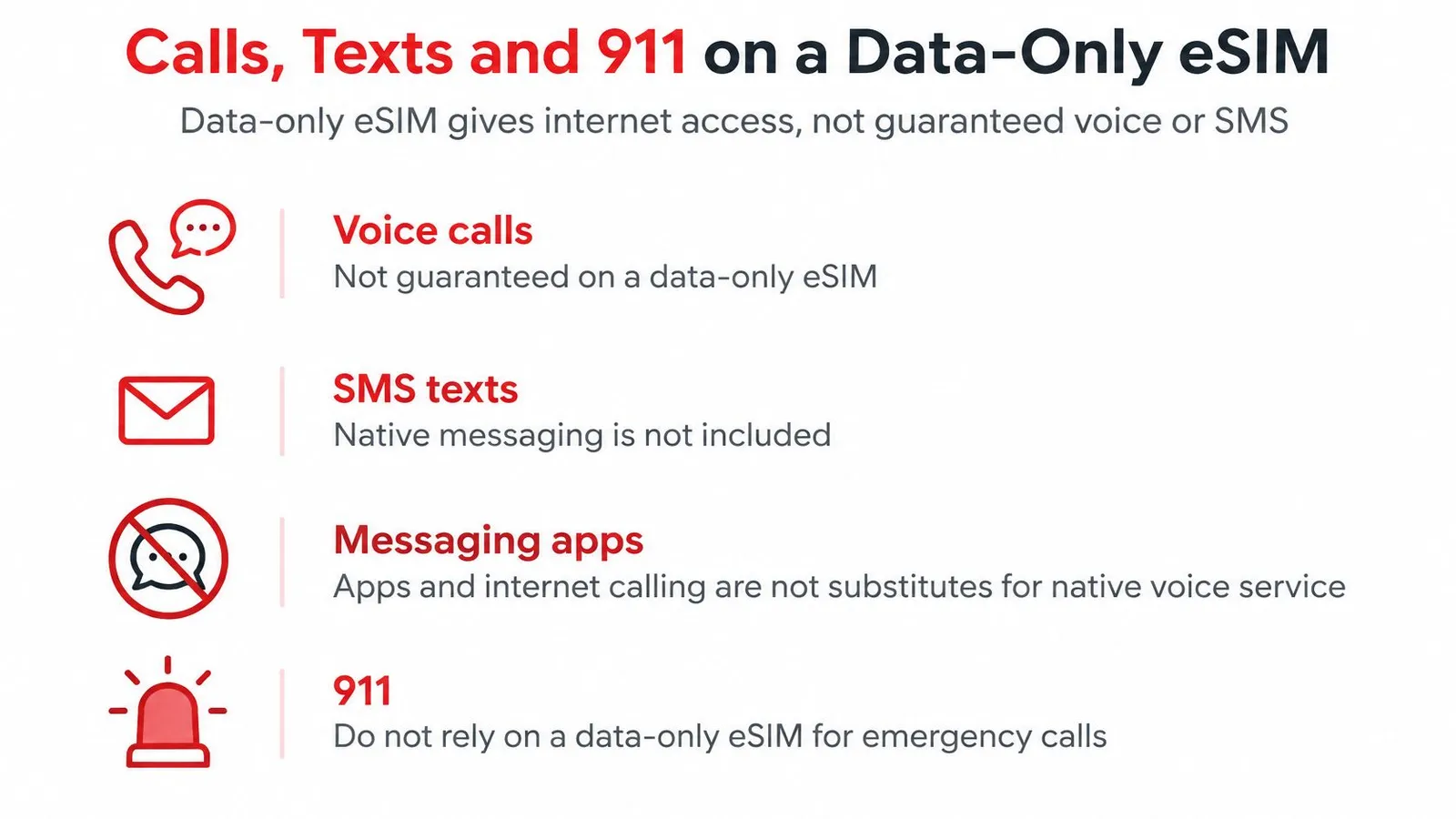
Carrier guidance is the part to read before installing anything. Freedom Mobile's eSIM support page says eSIM-compatible phones should be checked for software and device support, and that the number associated with an eSIM can dial 911. Read that second point narrowly: the number can dial 911, and a data-only plan still is not a voice plan. Older or region-specific handsets add another risk, because voice increasingly depends on VoLTE as legacy networks retire.
The working pattern is simple: keep the home SIM for calls and texts, use the travel eSIM for data. One RedSim customer, Aoife Byrne, described keeping her normal SIM for calls and texts and using the eSIM for data so her home number stayed active for the whole trip in the US and Canada.
A pre-departure checklist to finish at home
- Confirm the handset is carrier-free and VoLTE-capable. Locked or imported phones fail at install, and a phone without VoLTE support can struggle for voice even when data works.
- Decide whether the home SIM stays active. Keeping it on for calls and texts requires dual-SIM mode; switching it off saves battery but cuts your usual number.
- Test that hotel and airline SMS codes arrive. If verification texts land on a disabled line, check-in gets awkward fast.
- Place a call, send a text and load a page on the eSIM line. Do it on home Wi-Fi, then again with Wi-Fi off.
- Plan for dead zones. Save emergency numbers, note where the nearest town sits on each driving day, and decide how you'd reach help without signal.
If the difference between a data line and a phone line is still fuzzy, this explanation of what an eSIM is covers the basics. For a route with long highway gaps or park boundaries, device compatibility and emergency access can matter more than a small price gap between two plans.
How to Install and Top Up Your Canada eSIM
Ten minutes at a kitchen table beats the same job attempted at an arrivals gate with luggage at your feet. The order below is the one that gets it done before departure.
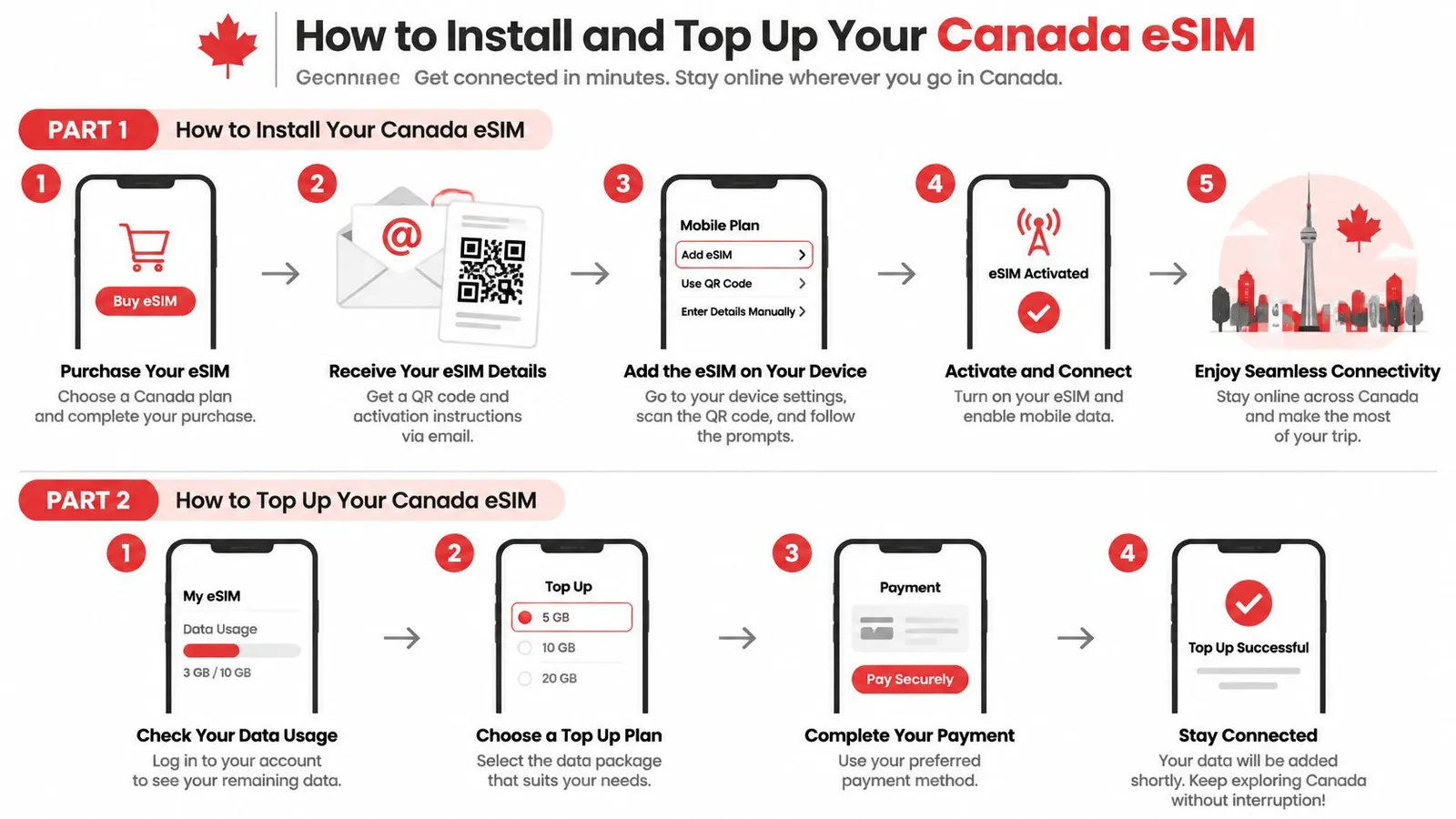
- Confirm the phone is SIM-free and eSIM-compatible before paying. A handset still tied to a carrier rejects the profile at install, after the money has changed hands. RedSim's device list is a quick way to confirm the model, and an unactivated eSIM is refundable if the phone turns out not to qualify.
- Install on home Wi-Fi. Use the QR code from the purchase email or the app's one-click install. The profile needs a data connection to download, so leaving it until after landing means hunting for airport Wi-Fi first.
- Label the new line. Name it something like Canada Data so the settings screen reads clearly and the wrong line never gets switched off mid-fix.
- Set the eSIM as the data line and enable roaming on that line only. This is the step that prevents home-carrier data charges. Leaving the home carrier's data roaming on is the most common and most expensive slip.
- Turn on hotspot if a laptop or second phone needs data. Check the source line as well as the toggle: a hotspot that's on but sharing from the wrong line still passes no data.
- Top up in the app on the active eSIM. No new QR code is issued, and the usage tracker is the number worth a weekly glance rather than a daily one.
Wi-Fi off is the only honest test. A line that loads pages on hotel wireless proves nothing about the eSIM profile; the same check with Wi-Fi disabled confirms the data line, the roaming toggle and the install itself.
The full sequence, including settings paths for iOS and Android, sits in this eSIM setup guide. Installs that stall go to 24/7 WhatsApp support rather than a help-page dead end.
The last check takes thirty seconds: the phone shows the eSIM line, a page loads on mobile data alone, and the plan's expiry date is written down. Do it before the suitcase closes.
Choose Your Plan and Confirm Before You Buy
Trip type narrows the shortlist faster than any spec sheet. Match yours to the row below, then settle the question in the last column before comparing anything else.
Starting plan by trip type
| Trip type | Starting plan | Check before buying |
|---|---|---|
| Solo tourist, one-week city trip | 1 GB, 7 days ($3.38) | Messaging and maps fit |
| Remote worker, one month | 10 GB, 30 days ($20.02) plus top-up | Hotspot support |
| Family sharing data | Larger allowance with hotspot on | Daily usage check |
| Business traveler who cannot lose connectivity | Plan with LTE fallback | Confirm LTE fallback first |
| Road trip through national parks | Plan with partner coverage on each highway | Confirm coverage and download offline maps |
| Multi-country trip including the US | North America regional plan | Which countries are included |
Geography explains why the starting plans differ. The CRTC market report reports that 5G reaches 94% of Canada's population, while rural and First Nations reserve coverage remains below the national average and the Territories have no reported 5G coverage. Speed badges and coverage maps mean little until they're checked against the route on your itinerary.
Six checks before you pay
- Write down the route. Cities, parks, highways and any border crossing, in order.
- Run that route through the coverage checks above. The partner network, LTE fallback and hotspot questions in the coverage section answer whether the plan holds up on it.
- Confirm the plan sells top-ups on the active eSIM rather than requiring a new QR code, so a mid-trip shortfall costs a few dollars instead of a reinstall.
- Confirm the phone is carrier-free, VoLTE-capable and set up for calls if anyone in the group needs a reachable number.
- Confirm the model appears on the compatible devices list. A minute of checking now beats a refund request later.
- Size the allowance with the buffer rule from the data section, and stretch it for a family trip. One hotspot feeding three phones drains faster than any single-user estimate, so size for the heaviest day, not the average one.
A plan that clears all six is the right purchase, whatever its headline price. Buy it early enough to install on home Wi-Fi: unused, unactivated eSIMs are refundable in full, so the risk sits with waiting until the airport, not with committing in advance.
RedSim sells country, regional and global eSIM data plans for 200+ destinations, with instant QR delivery, one-click installation on compatible phones and 24/7 support for the setup questions that show up at the worst possible moment. If your itinerary runs through Canada, the United States or both, compare the Canada and North America options against the route you've written down, then install and test the plan before the flight. Start at RedSim and buy the plan that clears your own checklist rather than the one with the loudest 5G badge.


 Australia