
 Macao

The standard advice on the best eSIM for Hong Kong is to buy the largest bundle you can afford, or the cheapest one that covers a week. Both rules fail here. Hong Kong gives away free Wi-Fi in hotels, shopping centres, cafés and every MTR station, so a modest allowance usually outlasts the trip, and the biggest bundle mostly buys data you'll never open.
What decides whether the thing works is duller and more technical: the host network under the brand, whether hotspot is permitted, whether the profile is installed before you land, and whether your purchase survives Hong Kong's real-name registration rules. This guide picks plans by trip shape, tests every pick against those four points, and names what to buy for a weekend, a working week, a family sharing one phone, and a route that crosses a border.
Best Hong Kong eSIM Picks by Trip Type
Pick the trip shape first and let the price list follow. A two-night city stay and a two-week remote-work stint need completely different plans, and the plan that wins one wastes money on the other.
Four tests separate a plan worth buying from a cheap one:
- Current network access: confirmed 4G or 5G on a major local carrier; a 5G logo printed on a legacy profile proves nothing.
- Arrival-ready delivery: the QR code or in-app install lands before you board, so the profile is already on the phone.
- Hotspot written into the plan: tethering permission stated explicitly in the plan terms, since the word "data" alone guarantees nothing.
- Top-ups on the same profile: extra data added to the eSIM you already have, with no new QR code issued.
The Hong Kong government tourism factsheet records 49.9 million visitor arrivals in 2025, up 12% from 44.5 million in 2024, split into roughly 37.8 million Mainland arrivals and 12.1 million non-Mainland arrivals, with that second group up 15% year on year. The non-Mainland mix spans Taiwan, the Philippines, the United States, South Korea, Japan, Thailand, Australia, Singapore, India and the United Kingdom, which is why instant digital delivery and a clearly stated validity period matter more than a polished app.
Hong Kong eSIM quick picks by trip
| Trip situation | Plan shape | Start with | Why this row |
|---|---|---|---|
| 2–4 day city stay, maps and chat | Hong Kong-only eSIM | 1 GB for about 7 days | Lowest cost when you never leave the city |
| One week of social, taxis and translation | Hong Kong-only eSIM | 5 GB | Covers photos and navigation without a regional premium |
| Laptop hotspot or video calls | Hong Kong-only eSIM with top-ups | 10 GB or more | Upload and tethering burn data faster than messaging |
| Hong Kong plus nearby Asian stops | Asia regional eSIM | 1–5 GB to start | One profile across borders, no airport SIM swap |
| Itinerary later leaves Asia | Global eSIM | 1 GB for 7 days | City or Asia plans cost less while travel stays in the region |
The host network is the specification most comparisons skip. Ookla's Hong Kong speedtest connectivity report ranks China Mobile Hong Kong first among tested 5G networks on median download, ahead of csl and SmarTone. A provider that names its local operators tells you more about your week than a brand name or a data label does.
Regional pricing sits low enough that a wrong guess costs less than a coffee. Asia regional plans in this bracket run $2.89 for 1 GB over 7 days, $10.94 for 5 GB over 30 days, $18.24 for 10 GB over 30 days and $25 for unlimited data over 7 days. Global plans start around $6.15 for 1 GB over 7 days, with validity running up to 30 days. One frequent traveller's summary fits the regional rows: "I move between a lot of countries for work and this saved me from buying a new SIM in each one. One app, pick the plan, done. Exactly the flexibility I was after" (Michael Chen, RedSim website).
Routes that keep going deserve the same discipline. If Hong Kong sits inside a longer multi-leg itinerary, one that might even include a privately chartered segment, the Approved Jets international flight guide covers the paperwork side of that planning. A ferry to Macau is the more common extension: that crossing needs its own coverage, and a Macau eSIM handles it without touching your Hong Kong profile.
Count the border crossings first, then buy the smallest geography that includes every stop.
Networks That Make a Hong Kong eSIM Strong
An eSIM is a reseller profile riding someone else's towers, and the towers decide everything you experience: whether the map loads in a basement restaurant, whether a video call holds, whether the phone drops to LTE at 3 pm in Central. Judge the plan by the host it names. A bigger gigabyte allowance tells you nothing about which towers your phone will use.
The coverage benchmark is unusually high, which sets the floor for what you should accept. The Communications Authority figures published by the Hong Kong government put 27.8 million mobile-service subscriptions on the books in March 2025 against a far smaller resident population, a 359% mobile penetration rate. More than 99% of subscriptions were already on 4G or 5G, and 5G subscriptions reached 8.8 million, a 116% subscriber penetration rate. 5G coverage exceeded 90% of the population, hit 99% in core business districts, and covered all MTR lines and 98 stations.
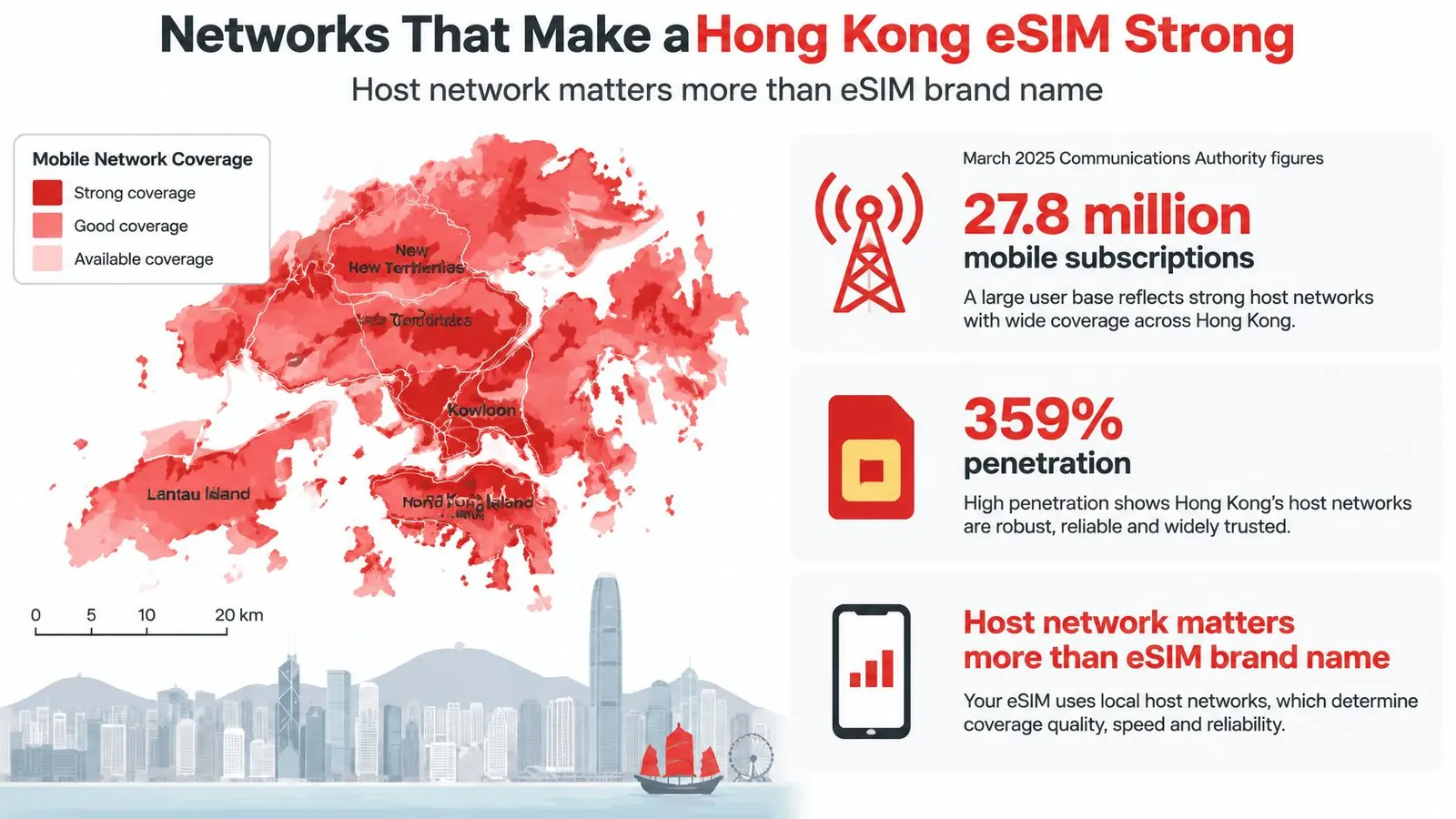
Those numbers explain where the risk sits. With coverage that close to total, dropped service usually traces to a profile that can't hold a signal indoors, a plan locked to one carrier with weak reception in your hotel, or a device pushed down to LTE with no fallback.
The medians below come from Ookla's Hong Kong speedtest connectivity report for mid-2024 and measure the host networks themselves.
| Network or market | Median download | Median 5G upload | 5G latency |
|---|---|---|---|
| Hong Kong market overall | 61.74 Mbps | Not reported | Not reported |
| China Mobile Hong Kong 5G | 168.56 Mbps | 25.70 Mbps | 26 ms |
| csl 5G | 142.20 Mbps | Not reported | Not reported |
| SmarTone 5G | 135.26 Mbps | Not reported | Not reported |
What the medians do and don't promise
Start with the gap between the rows. The market median blends millions of connections, indoor and outdoor, peak and off-peak. A phone attached to a 5G host should run well above that blend, so a profile capped on LTE will feel slow even in a city this well covered. The figures that matter for work are upstream and latency: a healthy 5G upload median is what carries your video feed and cloud sync, and low twenties latency is what keeps a call feeling live. Treat the table as a ceiling a strong host can reach, and expect any roaming profile to land below it.
Four things decide where you land. The roaming agreement sets which towers you may attach to. Device bands decide whether your phone can hear a given frequency at all. Congestion and building depth decide what survives a Friday night in Mong Kok. The profile's own 5G policy decides the rest, because a plan can advertise 5G and still connect on LTE in the one building where you needed coverage.
Multi-carrier access earns its price here. A plan riding both csl and SmarTone stays within reach of the speed leader while giving you a second operator the moment a hotel wall kills the first signal. That redundancy is worth more than an extra 20 GB, since extra data on a dead signal delivers nothing, and it keeps hotspot tethering alive when the primary connection drops. A single-carrier profile bets your whole trip on one operator's reach into the exact building where you're staying. Before buying, confirm the named operators and the 5G policy. After activation, run a speed test and look at upload and latency first; download is the last number to worry about in this city.
Data Allowances That Match Real Days
Gigabyte labels are marketing; a planning range is a decision. The ranges below are budgeting estimates for ordinary travel behavior. Use them to size the plan, then let the usage counter in the app correct you on day two.
Hong Kong trip data planning ranges
| Main use | Rough data | Allowance to buy | Validity cue |
|---|---|---|---|
| Maps, chat and payments | 0.2–0.5 GB per day | 1 GB | 7 days for a short stop |
| Taxis, translation and light social | 0.5–1 GB per day | 5 GB | About one week |
| Photo uploads and reels | 1–2 GB per day | 5–10 GB | Match the nights you will post |
| One hour of video calls | Around 1 GB per hour | 10 GB or a top-up | Add data before meeting days |
| Laptop hotspot or two devices | 2–5 GB per day | 10–20 GB or short unlimited | Use unlimited only for a few heavy days |
The video-call figure is the softest row in the table. Video quality varies by app and camera settings, so treat it as a rough planning estimate and check the usage counter after your first call.
What a five-day trip actually burns
Take a five-day stay on a 5 GB plan. Arrival day runs heavy: airport Wi-Fi ends at the train, and maps, ride-hailing and hotel check-in push you into the 0.5–1 GB band. Two sightseeing days with photo uploads and social scrolling sit in the same range. A quieter day absorbed by hotel and MTR Wi-Fi barely dents the counter.
That leaves roughly 1 GB of headroom for one video call or an accidental hotspot session, which is the margin a capped plan needs.
Step up to 10 GB when calls are routine or a second device tethers daily. Twenty gigabytes belongs to one phone shared across a family, or a traveler streaming on cellular rather than hotel Wi-Fi.
When unlimited earns its money
Unlimited plans cost more and usually carry fair-use conditions, so treat them as a tool for a specific job: a few heavy hotspot days, a long stay, or a traveler who refuses to watch a counter. For a five-day city trip, a capped plan at a fraction of the price will not run out. Buying unlimited for Hong Kong often pays to solve a problem you don't have.
Match validity to the nights you will spend: seven days for a weekend that runs into a Monday, up to 30 days for a longer stay or a base for day trips. Confirm the plan lets you add data to the active profile rather than issuing a fresh QR code, because reinstalling at a hotel desk is the friction you paid to avoid. The plan-selection guide sets sizes and durations side by side if you are between two tiers.
Sizing rule: pick the allowance that covers your heaviest day.
Real-Name Registration and Pre-Purchase Checks
Buying an eSIM takes three minutes. Complying with Hong Kong's SIM rules is the part comparison pages leave out, and it decides whether your data works on arrival morning or stalls at a registration screen.
The Office of the Communications Authority guidance is direct: all SIM cards used in Hong Kong must undergo real-name registration, tourists register with their original travel documents, and operators may suspend SIMs that do not comply. Visitor guidance for the city's tourist SIM service repeats the same instruction: activate under your real name.
That obligation sits apart from how easy the purchase feels. A checkout that never asks for documents can still deliver a plan whose local profile carries a registration duty, so ask four questions before you pay:
- Registration timing: is any registration handled digitally before arrival, or does it happen on landing?
- Document type: does the provider need your passport or other original travel document, and whose name must match the traveler?
- Operator profile: does the plan use a local operator profile that triggers the local registration duty?
- Purchaser identity: if you're buying for a spouse, child or colleague, will a name mismatch suspend the line?
Business travelers and families buying for someone else should weigh the last point hardest. A failed registration cuts maps and meeting links on the first morning, which costs more than the few dollars saved on a simpler-looking plan. RedSim asks for no passport, ID or KYC to buy or use an eSIM, so the purchase itself never stalls on document checks. The Hong Kong rule still applies to any SIM used in the city, so keep your travel document within reach in case the activated profile asks for registration. Run the device compatibility check at the same time, because a phone that supports eSIM is the other half of the pre-flight check.
Choose the RedSim Plan Before You Fly
Buy the city plan when every night is in Hong Kong. Buy the Asia or global plan only when the route crosses a border. That one rule covers most trips.
The Hong Kong SAR China eSIM starts at $2.19 for 1 GB, which fits a city break, a business week, or a family trip where one phone carries the maps. Before paying, check the host network named on the plan page. A Hong Kong eSIM is only as strong as the local 4G/5G carrier it rides, and that decides indoor signal and hotspot reliability far more than the size of the data label does.
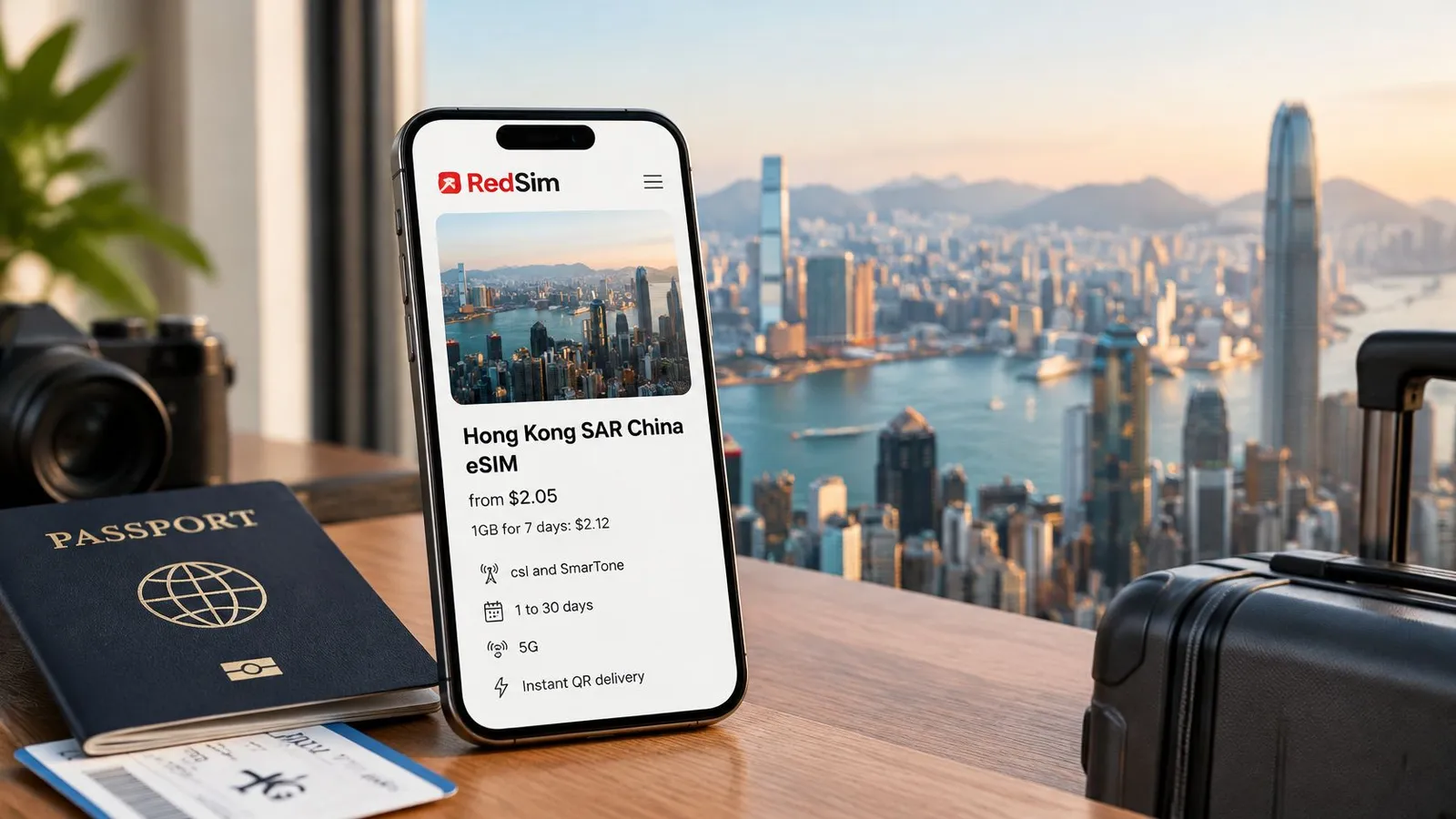
When the itinerary hops to another Asian country, the Asia regional plan covers the whole run on one profile: $2.89 for 1 GB over 7 days, $10.94 for 5 GB over 30 days, $18.24 for 10 GB over 30 days, or $25 for unlimited data across 7 days. The global eSIM earns its place only when a later stop leaves Asia, and its plans run up to 30 days.
Buy early rather than at the gate. An unactivated eSIM is refundable in full, so locking in the plan a week before departure carries no downside, and it leaves time to fix a compatibility problem while support is still a WhatsApp message away.
Three moves before the flight: match your nights and borders to one plan, run the registration check in the traveler's own name, install on home Wi-Fi.
How to Install a Hong Kong eSIM
Installation is where most arrival-day disasters are prevented, and it takes about as long as making coffee. Work through the steps in order, on Wi-Fi, before you leave.
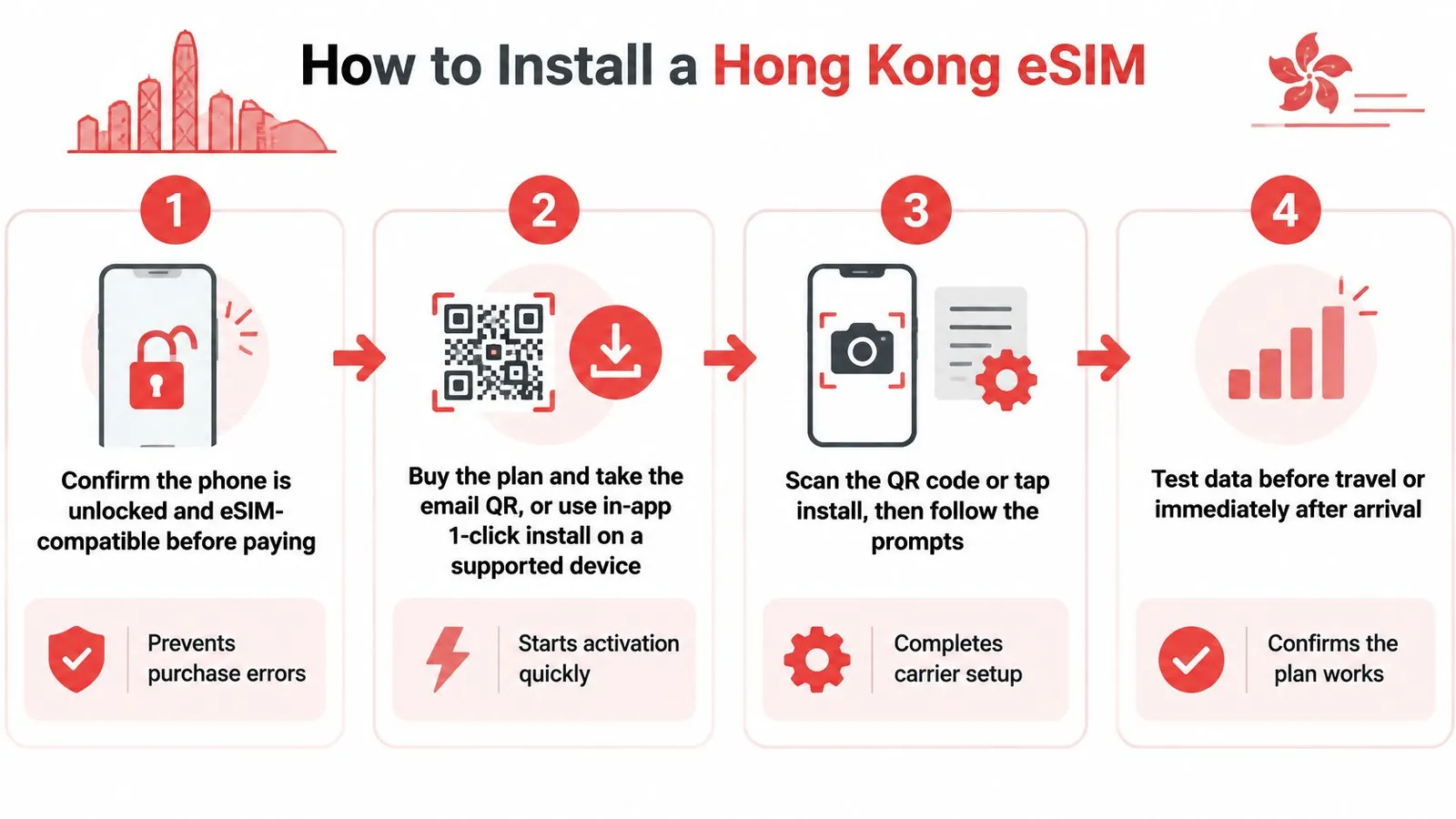
- Confirm the phone is carrier-free and eSIM-capable. Check the model against the provider's compatibility list. An eSIM cannot be installed on hardware that doesn't support it, and a carrier lock will block activation after you land.
- Buy the plan and take delivery of the QR code by email, or use in-app one-click installation on a supported iPhone or Android device. Save the email; you'll want the SM-DP+ details if a manual entry is needed.
- Install while still on home Wi-Fi. RedSim's average activation time is 2 minutes across its 200+ destinations, and doing it at home removes the airport scramble for a signal.
- Label the new line "Hong Kong" and keep your home number active for calls and bank messages if the phone runs dual SIM. Data-only plans don't carry a local number, so your own SIM stays useful.
- Set the travel line as the mobile-data line, and switch data roaming on for that line only. Leaving roaming on for the home line is the classic way to trigger a bill.
- After landing, flip airplane mode on and off once if the network doesn't attach within a minute. It forces a fresh network scan and fixes most stalled activations.
- Turn on the hotspot only after confirming the plan allows sharing, then connect the laptop, tablet or a second phone. Tethering is where a light plan turns heavy.
- Check the usage counter, then top up on the same profile if a meeting day or a navigation-heavy afternoon burns through data faster than expected.
Follow the provider's setup walkthrough if the prompts differ from the ones described here; iOS and Android phrase the same actions differently, and the labels move between versions.
Stripe handles checkout, so card details never sit with the seller. Support runs 24/7 on WhatsApp and email, with WhatsApp replies typically arriving in around two minutes, which matters at 11 pm in a hotel lobby when the line won't attach. The success test is simple: open a map, route yourself from the airport to the hotel, and watch the usage counter move. If both happen, you're done.
Fix Indoor Signal and Hotspot Drops
Hong Kong's 5G footprint is above 99% as of March 2025, per the Office of the Communications Authority spectrum report, and the bands behind that figure explain why indoor signal still drops. Public mobile spectrum is spread across low, mid and high bands, including 700 MHz, 3.3 GHz, 3.5 GHz, 4.9 GHz, 6/7 GHz and 26/28 GHz.
Low band such as 700 MHz penetrates buildings and carries over distance. Mid band around 3.3 and 3.5 GHz balances capacity against reach. High bands at 26/28 GHz barely pass through a wall. A phone showing 5G on the street can fall to LTE in a basement restaurant, a conference room or a hotel corridor. Broad LTE fallback is what keeps chat and maps alive while the handset hunts for a better band.
Diagnose the problem by what the phone shows you:
| What you see | What it means | What to do |
|---|---|---|
| Indicator reads LTE instead of 5G | The handset has dropped to indoor fallback spectrum | Keep working. LTE handles messaging, maps and usually calls |
| Signal at the window, nothing at the desk | The building blocks mid and high bands on one side | Take the session near the window or a floor lower |
| Bars present, usage counter frozen | Activation fault rather than a coverage gap | Contact 24/7 WhatsApp support with the phone model and error message ready |
| Counter moves, speed does not | Configuration issue or congestion | Run the checks in the slow-data troubleshooting guide |
| Laptop call or hotspot session coming up | Upload speed and latency decide whether it holds | Measure both first, then top up on the same profile before the heavy day starts |
Running dry mid-route is the one failure you can schedule around. Check the usage counter before a meeting or a navigation-heavy afternoon, and top up then rather than when the map stalls.
Buy the geography your itinerary touches, put it on a strong local host, and install it before you reach the airport. Start at RedSim and match the plan to your nights and borders.

 New Zealand

 Taiwan