
 Japan

The most popular advice about the best eSIM for Philippines travel starts with the wrong question: which provider offers the most data? A huge allowance won't help when the plan's Philippine partner network doesn't serve the next stop. The better purchase matches the network to the route, the allowance to the daily workload, and the validity period to the actual stay.
For most visitors, the sensible default is an international Philippines data eSIM with a named local partner. Island travelers should prioritize coverage beyond Metro Manila. Laptop users should prioritize tethering and top-ups. Travelers crossing borders should compare regional coverage before buying separate country plans.
Best eSIM for Philippines by Trip Type
Philippines eSIM quick picks by trip
These are shopping profiles, not promises that every provider sells the same package.
| Trip | Plan shape to shortlist | Why this shape | Watch-out |
|---|---|---|---|
| Short Manila or Cebu stay | Country eSIM, smallest suitable tier, validity covering the stay | Maps, rides, and chat favor a modest pack when video stays on Wi-Fi | City performance doesn't establish provincial coverage |
| City stay plus island hopping | Country eSIM, mid-sized allowance, hotspot permitted, validity covering the route | Travel days and unreliable venue Wi-Fi can increase mobile-data use | Confirm coverage for each island, not just the arrival city |
| Philippines plus nearby Asian countries | Asia regional eSIM | One installation across included destinations | Compare the regional premium against separate country plans |
| Remote work with a laptop | Larger country or regional plan with top-ups | Video meetings and cloud transfers need more headroom than navigation | Test tethering before the first work session |
| Family sharing one connection | Hotspot-enabled plan on the host phone | One purchase and one usage tracker | Everyone loses access when the host phone disconnects or leaves |
The short-city-stay pick is deliberately modest. Travelers using accommodation Wi-Fi for downloads and streaming shouldn't pay for a large allowance merely because it looks reassuring.
The island-hopping pick needs flexibility rather than just more gigabytes. A top-up path matters when changed ferry schedules, extra nights, or failed accommodation Wi-Fi extend mobile use.
For multi-country trips, a regional plan makes sense when every destination appears on its coverage list. Thailand, Malaysia, or Indonesia shouldn't be assumed included just because the package says Asia.
Buy for the connected devices
Remote workers should size the purchase around the laptop's workload, not the phone's browsing history. Families can share a hotspot economically when they stay together, but separate connections are more practical when adults split up.
Before comparing providers, travelers can use My Global Trips to find AI-powered trip recommendations and settle the route. A fixed destination list makes choosing between country and regional coverage much easier; the guide to choosing the right plan helps translate that itinerary into a suitable package.
Every row requires the same device checks:
- Device eligibility: The exact handset variant must support eSIM and be carrier-free.
- Radio compatibility: The handset must support the Philippine LTE or 5G bands used by the partner network.
Mobile access deserves priority: the Philippine Statistics Authority and Department of Information and Communications Technology reported that 98.8% of internet users aged 10 and older used a cellphone to access the internet in 2024, according to their national ICT survey infographic. The decisive purchase detail is therefore the working local network, not the biggest allowance label.
Globe Smart and DITO for Travel Data
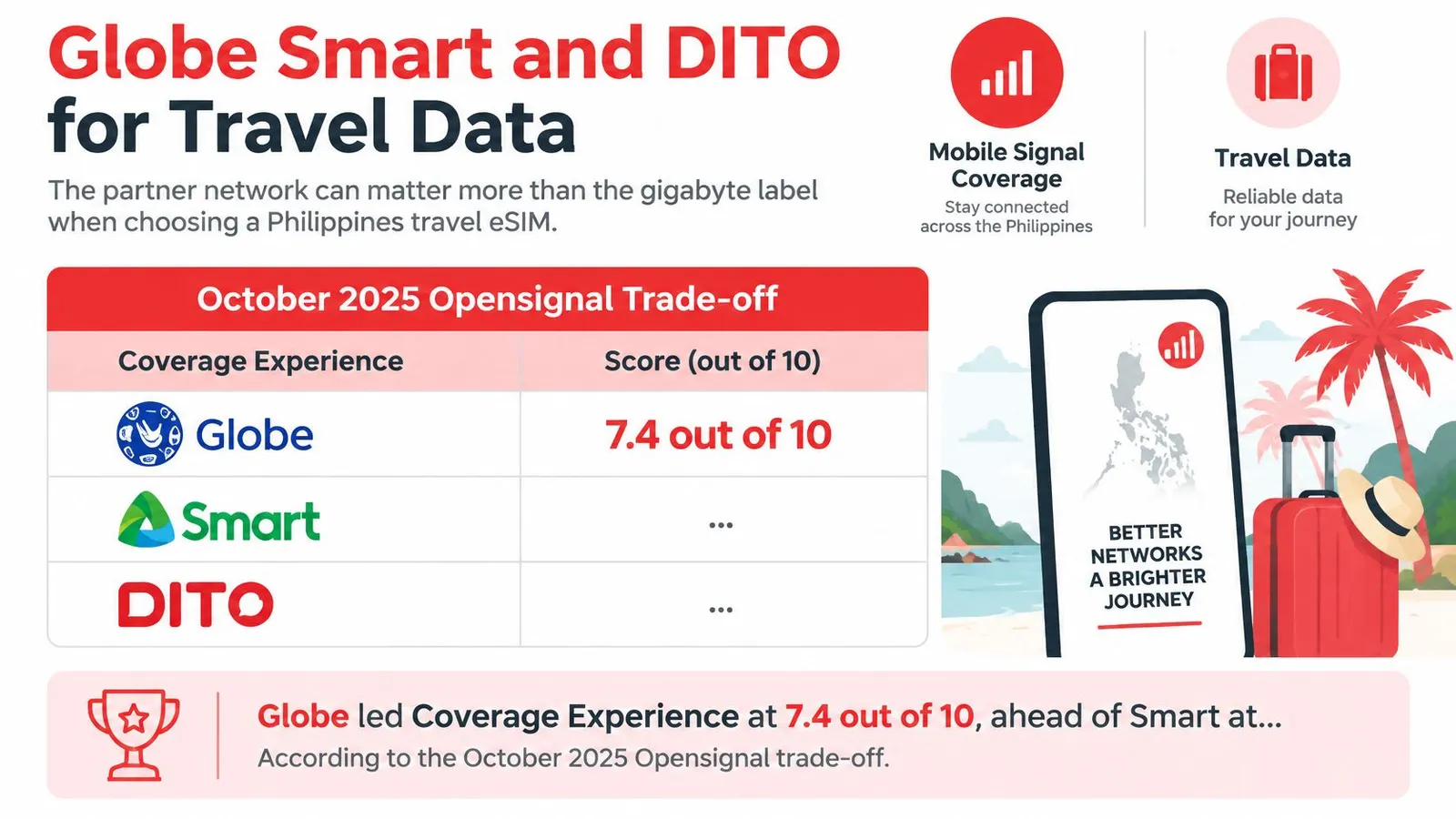
For an itinerary that leaves Manila, shortlist Globe first. Opensignal's October 2025 Philippines report recorded Globe's Coverage Experience at 7.4 out of 10, ahead of Smart at 7.2 and DITO at 3.8.
| Network | Coverage Experience | Best reason to shortlist |
|---|---|---|
| Globe | Widest reach of the three | Island transfers and provincial destinations beyond the big cities |
| Smart | Broad reach with a strong urban showing | City-heavy itineraries that still include regional stops |
| DITO | Narrowest reach, concentrated in connected areas | Fixed stays in cities and towns with confirmed coverage |
Pick the network that matches the route. A traveler moving between islands needs reach across provinces. Someone working from a single Metro Manila address needs consistent performance in one place. Globe's lead matters most in the first case and least in the second.
Choose a Globe-backed plan when coverage decides the trip, and treat the national score as a starting point rather than a promise. Reception at a specific resort, beach, or pier depends on that destination, so confirm coverage there before buying.
The comparison chart highlights that coverage trade-off.
Coverage and availability answer different questions
Coverage Experience measures reach across the places people live, work, and travel. Availability measures how often connected users have a signal. A carrier can post a high availability result while still leaving islands and provincial roads unserved.
That gap explains DITO's position. Strong performance where its network reaches makes it a reasonable pick for a fixed urban stay, and a poor default for someone ferrying between islands.
Smart sits between the two. Travelers with a city-heavy route gain little from paying extra for Globe's edge, so a well-documented Smart-backed plan deserves consideration. The package's named partner and destination coverage still decide the outcome.
Network rule: Prefer documented destination coverage over a peak-speed promise when the itinerary includes provincial towns or island transfers.
What the listing must reveal
A useful product page names the Philippine roaming partner and states whether manual network selection is supported. A vague label such as 5G compatible says nothing about which local operator carries the connection.
Travelers should distinguish these purchasing details:
- Named partner: The listing identifies which Philippine network carries the connection.
- Permitted selection: Manual selection works only among networks authorized for that eSIM.
- Technology access: The package explicitly permits the advertised LTE or 5G service, subject to local reception.
Never assign a travel brand a carrier based on an old review or another package under the same brand. Roaming arrangements can differ between products.
After landing, run a functional test: load the destination map, check a ride-hailing pickup location where service is offered, and briefly connect the intended hotspot device. There is no need to order a ride merely to test data.
A map that loads and a laptop that connects beat a speed-test screenshot. Confirm the actual applications work before leaving the airport connection area.
Why Manila Speed Is Not the Whole Country
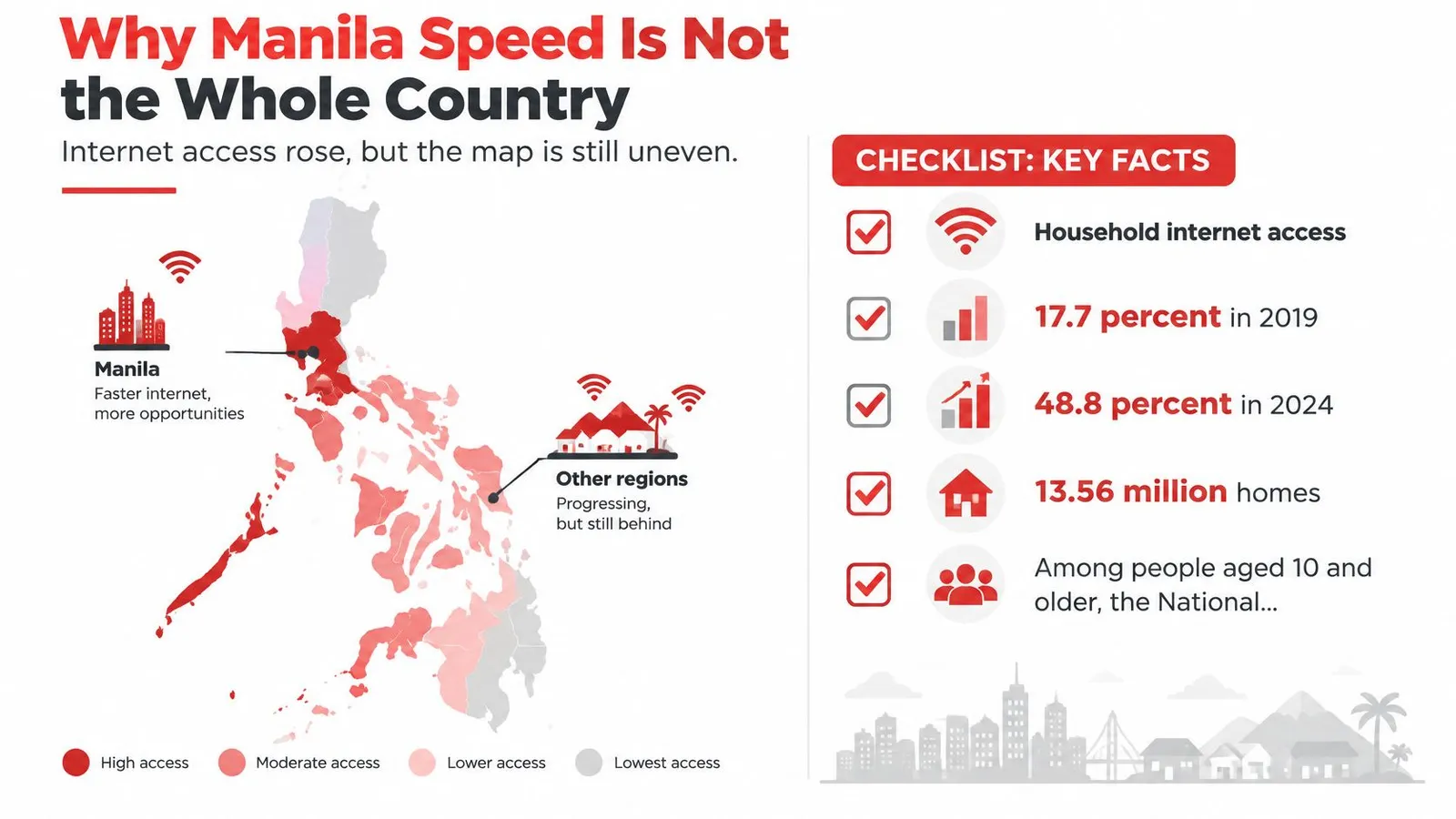
A fast connection in Makati says nothing about what a provincial guesthouse will deliver. National connectivity has expanded, but a visitor still needs a destination-level buying decision.
The Philippine Statistics Authority's household internet-access release reports that 48.8% of households, or 13.56 million homes, had internet access in 2024, compared with 17.7% in 2019, and that among people aged 10 and older the internet-user share was 79.3% in the National Capital Region, 74.9% in Cagayan Valley, and 74.3% in the Ilocos Region.
Access is not the same as speed. Those figures describe household connectivity and internet use, not tourist eSIM performance, and the practical lesson is narrower: a national headline cannot substitute for checking the places on an itinerary.
Cagayan Valley and the Ilocos Region trail the capital on internet use, so routes north of Manila deserve their own coverage check rather than confidence carried over from a city speed test.
Check the purchase terms in this order
A buyer should settle coverage before comparing convenience features.
- Named Philippine partner or permitted network selection. An unexplained network arrangement leaves the most important purchase question unanswered.
- LTE service, with 5G only where offered. A 5G badge isn't a promise of continuous 5G reception throughout the route.
- Hotspot policy. The allowance must be usable in the way the traveler intends, including any tethering restrictions.
- Top-ups without a replacement QR code. Adding data to the active profile is less disruptive than installing a new profile while traveling.
- Full-refund eligibility before installation or activation. The policy should explain both conditions clearly; an installed but unused profile shouldn't be assumed refundable.
The last check is a purchase safeguard, not permission to test a profile and return it afterward. Travelers whose plans remain uncertain should read the activation and refund wording before installing anything.
Plan for the next stop
Say a traveler leaves a well-connected Manila hotel for a smaller island. Before departure, the useful preparation is to download the next destination's offline map, save the accommodation address, and store booking confirmations locally.
Offline preparation is most useful before the signal weakens, not after a map stops loading.
Poor performance also needs diagnosis. A building's interior, an exhausted allowance, or an incorrect line selection can produce a bad experience without proving the carrier lacks coverage; the slow-data troubleshooting guide helps separate those causes before a plan gets blamed for a settings problem.
Country coverage stays country-specific on onward trips. A Japan eSIM runs on a different local-network arrangement, so expectations formed in the Philippines shouldn't carry across borders.
The purchase decision ends where the itinerary ends. Match the partner network to the route, match the data tier to the number of days, and treat any coverage claim that stops at Manila as incomplete.
Travel Data eSIM or a Local Philippine SIM
The assumption that every eSIM avoids local registration is wrong. eSIM describes the digital SIM format, not the subscription's legal status.
For locally issued subscriptions, Globe's SIM Registration Act help page explains that registration covers physical SIMs and eSIMs, and foreign tourists must provide a passport, Philippine hotel or residence address, and return or onward ticket, with tourist registrations valid for 30 days.
Travel data eSIM vs local Philippine SIM
| Product | Provisioning | Local registration | Phone number and SMS |
|---|---|---|---|
| International travel data eSIM | Foreign-issued roaming data service | Typically not the local tourist-registration process; product terms must confirm | No Philippine number or local SMS codes on a data-only package |
| Philippine operator SIM or eSIM | Locally issued subscription | Required under local operator rules | Local number; voice and SMS inclusion follows the package |
An international roaming data eSIM is a different product from a Philippine operator's locally issued subscription. The clean purchase is one whose checkout page identifies the product type, explains activation, and states whether any identity checks apply.
Data service doesn't replace a telephone number
A data-only package supports messaging applications, navigation, browsing, and internet calling through compatible apps. It doesn't receive SMS codes addressed to a Philippine number, replace the home number used by a bank, or provide ordinary cellular voice calls unless voice is explicitly included.
The practical arrangement is to retain the primary SIM for account-verification texts and assign internet traffic to the travel line. Receiving home-network texts still requires an eligible home service and roaming arrangement; the travel eSIM doesn't control that.
Device eligibility is a separate question from registration. The compatible-device list helps establish whether the exact phone model supports the intended installation.
- Choose international data when maps, messaging, and app-based communication cover the trip.
- Choose a local subscription when a Philippine number is necessary and the traveler can meet the document requirements.
- Resolve missing documents early when there's no hotel booking or onward ticket. An international data product with clearly stated requirements is a cleaner connectivity option, but it doesn't replace immigration or entry obligations.
The checkout page should settle the product distinction before payment. A digital profile alone says nothing about whether a local number, SMS service, or registration process comes with it.
Reliability for Work Family and Multi-Country Routes
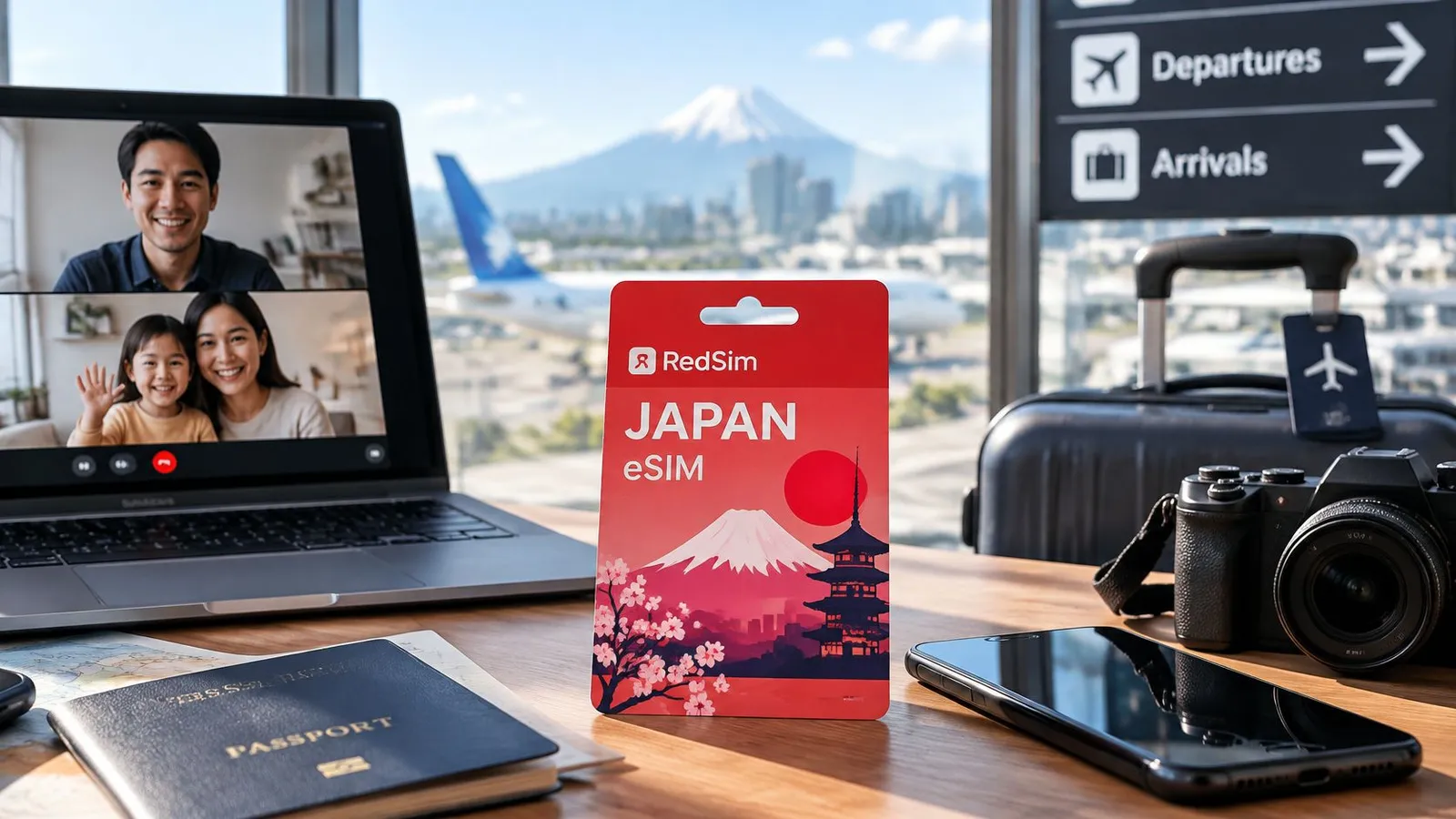
A consultant taking a 9 a.m. video call from a Cebu hotel room and a family sharing one phone for ride bookings are buying two different products, even when the plan label is identical. The worker needs a connection that stays usable for the full call. The family needs one handset that keeps everyone online without emptying the shared allowance by lunchtime.
In Opensignal's April 2025 Philippines report, DITO led Consistent Quality at 60.9%, compared with 47.7% for Globe and 44.9% for Smart. That metric tracks whether a connection supports common mobile tasks like video calls and app use, which is exactly what breaks first on trips like these.
Where each workload fails first
The right plan is the one that survives its weakest moment, not the one with the biggest gigabyte figure. Each workload has a different failure point, and each has a plan feature that covers it.
| Workload | What fails first | Plan feature that covers it |
|---|---|---|
| Laptop work session | Restricted tethering, or an allowance too small for a full day of cloud files | Confirmed hotspot permission and headroom above the phone's own use |
| Family hotspot | One device draining the shared data, or the host phone losing battery or signal | In-app usage tracking, so the family sees consumption before it runs out |
| Multi-country route | A border crossing onto a destination the plan doesn't cover | Every onward country named in the plan's coverage list |
Before a work session, run the full workflow once: connect the laptop, open the required cloud files, and test the meeting application. Automatic photo backups, operating-system downloads, and cloud synchronization should wait for a fixed connection.
Work permission is a separate question from connectivity. Travelers planning an overseas working stay can explore visa requirements for remote work through Expat Global Medical rather than assuming that a working data plan establishes permission to work.
Country pricing versus regional convenience
For a Philippines-only trip, RedSim's smallest Philippines data tier costs $2.22. Its Asia options cost $2.89 for 1 GB for 7 days, $10.94 for 5 GB for 30 days, $18.24 for 10 GB for 30 days, and $25 for unlimited data for 7 days.
The Asia regional plan listing is the right comparison for a route continuing to nearby countries. Confirm each destination's inclusion, then compare the total trip cost rather than treating the entry price as equivalent value.
The service supports hotspot sharing, in-app usage tracking, and top-ups on the active eSIM, which covers the gaps that appear mid-trip. Unlimited buyers should still read the package's applicable speed and tethering conditions rather than interpreting the label as a performance guarantee.
The buy decision is straightforward: country coverage for a Philippines-only holiday, a larger tethering-friendly allowance for work or shared use, and regional coverage when the onward route justifies it. Purchase before departure, while there's time to resolve device or package questions.
How to Install a Philippines eSIM Before You Fly
Install the profile while you still have reliable Wi-Fi and access to the purchase email. Check activation timing as a separate question, because loading the profile and starting the package can be two different events.
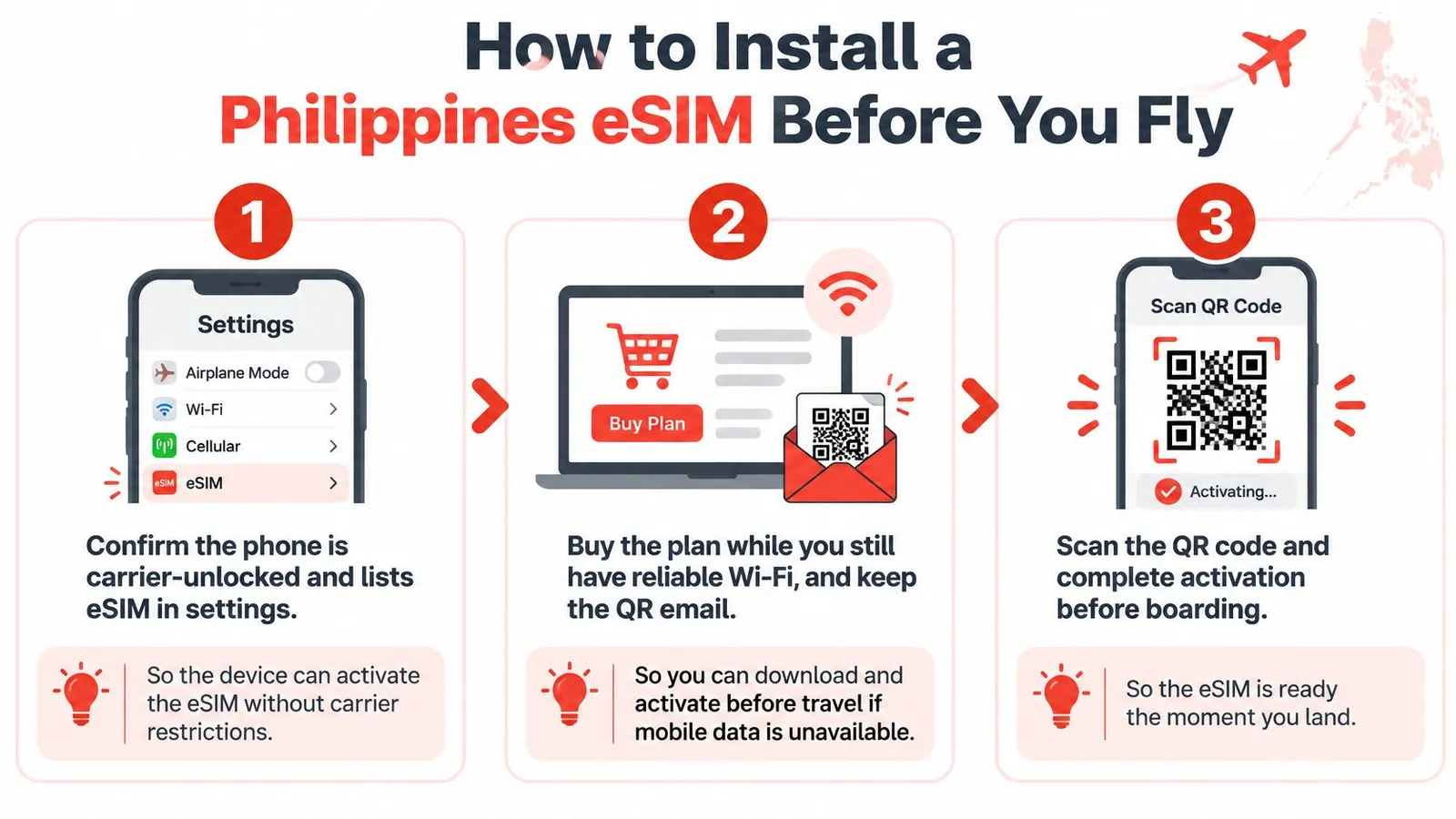
Start with eligibility. Confirm the exact phone is free of carrier restrictions and shows an eSIM option in its device settings, since regional variants of the same model do not always support eSIM. Check the settings menu on the handset you will carry rather than trusting the spec sheet.
Prepare the profile and line settings
Buy on reliable Wi-Fi and retain the QR email. Keep the order details reachable from a second device or a saved file. A QR code displayed only on the phone being configured is awkward to scan.
Install through device settings or the compatible app workflow. RedSim delivers the QR code by email and offers 1-click installation on compatible phones, which brings setup to roughly two minutes. If a connection step fails later, work through the setup guide before deleting anything; a deleted profile is harder to recover than a failed connection.
Label the travel line clearly. A name like "PH Data" keeps you from editing the wrong subscription's settings when both lines appear in the same menu.
Assign mobile data to the travel line. Turn on data roaming for that line if the provider requires it, and switch off automatic data switching so the phone cannot fall back to the home line.
Respect the activation rule
Read when validity starts. A first-connection package can stay dormant until arrival; a package that starts at installation needs different timing. Installing early without checking can burn usable days before departure.
Test the live connection after landing. Turn off Wi-Fi briefly and load a map or website through mobile data. Airport Wi-Fi can hide the fact that the eSIM has not connected.
Troubleshoot without removing the profile. Toggle airplane mode, confirm the selected data line, and touch the APN only when the provider supplies a specific setting. An unrelated APN copied from a forum creates a second fault on top of the first.
The costly mistake: enabling data roaming on both lines. Roaming belongs on the travel eSIM only; left active on the home SIM, it produces the carrier charges the eSIM was bought to avoid. Keep the purchase email and provider instructions saved offline before boarding.
WhatsApp support answers around the clock, typically within about two minutes, if an installation stalls. Top-ups apply to the active profile without a new QR code, and a full refund covers any eSIM that was never installed or activated.
RedSim offers Philippines travel data and Asia regional plans with QR delivery, hotspot sharing, and active-eSIM top-ups. Travelers can visit RedSim, choose the package that matches the route and connected devices, and complete setup before the flight.
 China
 Canada