
Most guides to the best eSIM for Portugal start in the wrong place. They compare prices before asking whether the traveler needs another plan at all. That's backwards. An EU resident may already have usable roaming in Portugal, while a visitor from the United States, Canada, Australia, or much of Asia probably needs prepaid local data. Check the home plan first, then compare networks, data, and plan length. That order prevents the two common mistakes, buying data that's already covered and buying too little data for a laptop.
Which Portugal eSIM Option Fits Your Trip
The direct answer depends on where the home plan comes from. Most non-EU visitors should buy a Portugal plan. Most EU residents with generous home data should not buy one unless there's a specific gap. The decision matters at scale, since Turismo de Portugal reported 32.5 million tourist guests in 2025, including 19.7 million foreign guests.
Find the matching row first
| Traveler | Best option | Typical plan length | Main reason |
|---|---|---|---|
| EU or EEA resident with generous home data | Use home plan first, eSIM only as backup | Not needed | EU Roam Like at Home covers Portugal |
| Non-EU visitor staying only in Portugal | Portugal country eSIM | 1 to 30 days | Local data without carrier roaming fees |
| Non-EU traveler crossing several countries | Global eSIM | 7 to 60 days | One profile covers borders without a SIM swap |
| Business traveler using a laptop | Country eSIM with hotspot | 1 to 30 days | Separate data line that can be topped up |
| Family sharing one connection | Larger data tier with hotspot | 7 to 30 days | Data shared across several devices |
An EU resident should treat an eSIM as backup or extra data, not as a default purchase. A non-EU visitor staying in one country gets the simplest value from a country plan. Anyone crossing borders should avoid installing a new profile in every country and choose a multi-country plan instead.
Business travelers and families have a different priority. They don't just need data on one phone, they need hotspot permission, enough allowance for other devices, and a top-up route that doesn't interrupt work or leave children offline mid-trip.
For a concrete price reference, a RedSim eSIM for Portugal costs $2.19 for the smallest data tier. That small tier suits a short, map-led break, especially for travelers who plan a short Lisbon getaway and spend most of the day on foot rather than streaming. Longer stays, laptop work, and shared family use need a larger tier.
Practical rule: match the plan to the traveler first. Price only matters after the right product type is clear.
Find the correct row, then run the home-plan, coverage, and data checks below before paying.
Check Whether You Need an eSIM at All
Not every traveler needs an eSIM for Portugal. That's the point many buying guides skip because it can lead to no purchase. The honest recommendation for many Europeans is simple, use the phone plan already in the pocket.
The European Commission Roam Like at Home consumer FAQs explain that the rules took effect on 15 June 2017, ending standard roaming charges for mobile calls, SMS, and data when customers travel within another EU country under eligible contracts. Portugal is one of all 27 EU countries covered by the regime.
Four checks on the home plan
- Confirm the home country: confirm it's in the EU or EEA and that the contract is eligible for roaming.
- Find the fair-use limit: check the roaming data cap, especially on unlimited or unusually inexpensive domestic plans.
- Check the warning system: confirm the operator sends a warning before the roaming limit is reached.
- List the gap: note any extra data, hotspot use, or separate work usage the home plan won't cover comfortably.
Buy an eSIM if the traveler comes from outside the EU, faces restrictive roaming limits, needs a lot of high-speed data, or wants a separate work line. Don't buy one just because travel shops treat it as standard kit, alongside packable essentials for work and travel, without checking what's already included.
No extra charge doesn't mean unlimited data, permanent use abroad, or identical service quality.
That distinction matters on long stays. A generous domestic bundle can still carry a smaller roaming allowance, and heavy hotspot use can reach that ceiling fast. Fair-use safeguards can apply particularly to unlimited or unusually inexpensive data plans.
Before considering installation, also confirm the handset can accept an eSIM by reviewing the list of compatible devices. EU residents should keep the home SIM active and buy an eSIM only for the specific gaps identified in the checks above.
Check Portugal Network Coverage Before You Buy
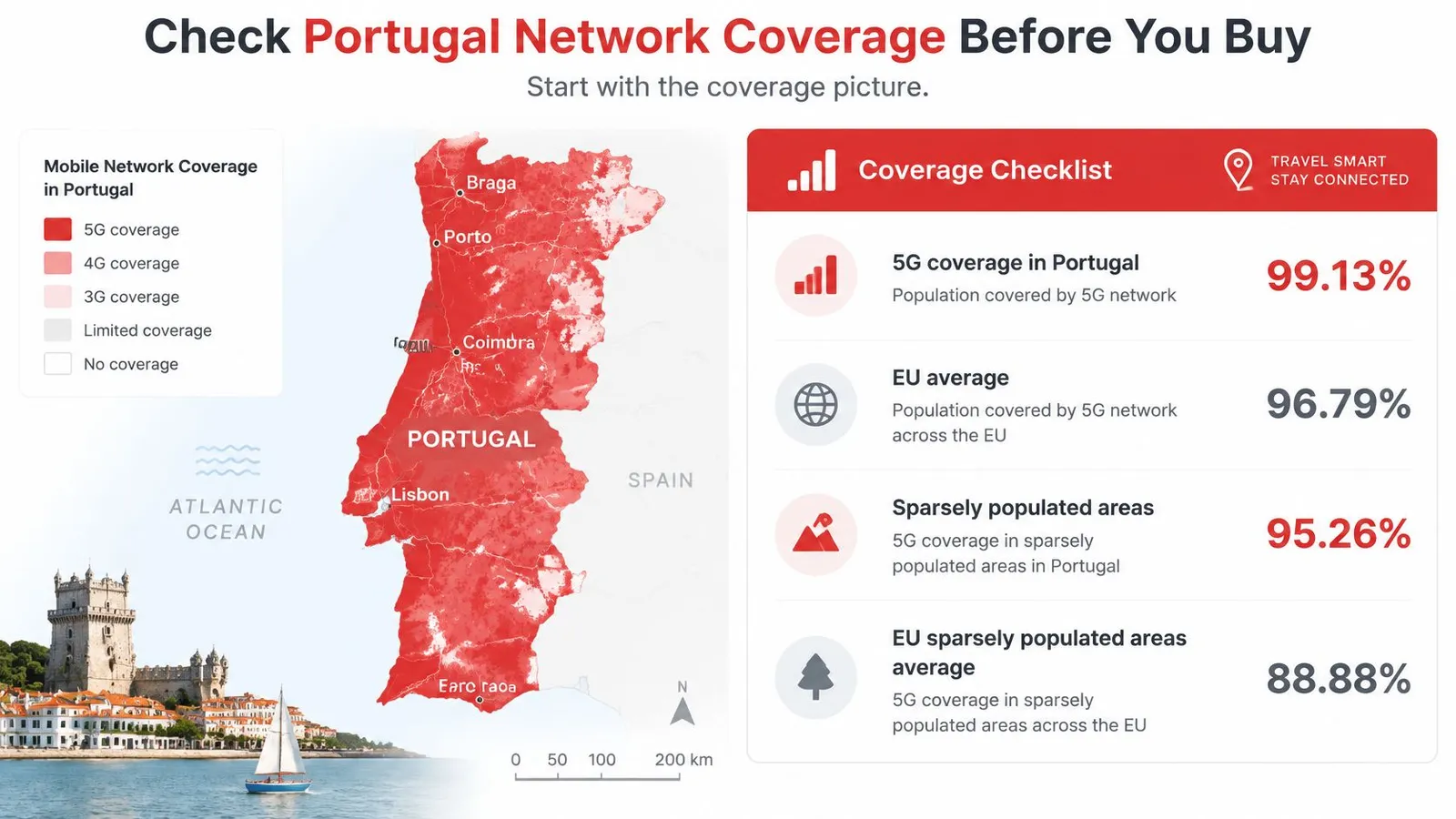
Portugal's coverage is strong, so the question isn't whether mobile data exists. It's whether a specific eSIM connects to a good partner network, includes 5G, and falls back cleanly to 4G outside city centers.
The 2025 Digital Decade country data reported overall 5G coverage of 99.13%, above the European Union average of 96.79%. Coverage in sparsely populated areas was 95.26%, compared with an EU average of 88.88%. Rural Portugal is therefore less of a blind spot than many travelers assume.
Brand names don't create signal
An eSIM can't improve radio capacity, congestion, latency, or rural reach. It can only use the partner networks enabled by its roaming agreement. Ookla's Portugal H1 2025 Speedtest Connectivity Report found NOS achieved the highest all-technology median download speed at 142.22 Mbps and the highest 5G median download speed at 267.46 Mbps. MEO recorded a 251.02 Mbps median 5G download speed in the same measurements.
Treat the MEO result as a useful comparison point, not as a promise for every plan. The Portugal plan discussed here lists Vodafone and NOS as its networks, so confirm NOS or Vodafone appears on the plan being bought rather than assuming MEO access is included.
For Lisbon, Porto, and other dense urban areas, confirmed NOS 5G is valuable for video calls, cloud synchronization, large uploads, and hotspot use. Outside those areas, broad access and reliable 4G fallback matter more than an advertised peak speed. A connection that stays usable on a train, in a small town, or on an island beats a fast result in one city test.
Run this checklist before purchase
- 5G included: confirm 5G access is included rather than limited to LTE.
- 4G fallback confirmed: check the plan keeps working where 5G capacity or signal drops.
- Manual network selection: verify the provider allows it if automatic selection picks a weak network.
- Hotspot permission: confirm tethering is allowed before relying on a laptop or second phone.
- Route coverage: check Lisbon, Porto, the Algarve, and any inland or island stops against the Europe coverage information.
Don't buy on 5G branding alone. Buy on named networks, fallback, and permissions that match the actual route.
Estimate How Much Data You Actually Need
Guessing a data tier is how travelers overpay or run out. Use a simple calculation instead. Multiply daily hours for each activity by its approximate hourly rate, multiply by trip days, then add 30% for background use and days that don't go to plan.
A worked example
Say a traveler uses messaging and maps for two hours a day at about 200 MB per hour. That's 0.4 GB per day, or 2.8 GB over a 7-day trip. Adding the 30% buffer gives about 3.6 GB, so a 5 GB plan fits with room to spare. The same method works for heavier use, and the guide to choosing the right plan helps compare the result with available tiers.
| Activity | Approximate data per hour | Plan size to consider |
|---|---|---|
| Messaging, maps and email on a phone | about 100 to 200 MB | 1 GB for a short trip |
| Social media with some video | about 300 to 600 MB | 5 GB for moderate use |
| Video calls on a laptop | about 500 MB to 1.5 GB | 10 GB for daily calls |
| HD video streaming | about 2 to 3 GB | 10 GB or more for regular streaming |
| Laptop hotspot with cloud sync | about 1 to 3 GB, plus background updates | check usage in the app after day two |
The hotspot row needs the most caution. Laptops consume data faster than phones because cloud sync, video conferencing, operating-system updates, and browser tabs keep running in the background. A traveler can feel careful while the laptop uploads photos, syncs documents, and downloads an update at the same time.
Network type also affects how practical a plan feels. ANACOM reported that, at the end of Q1 2024, 59.1% of mobile accesses used 4G, 19% used 5G, and 21.9% still used 2G or 3G. Among mobile-internet users, 23.9% used 5G, representing about 2.6 million people.
That mix makes the buying rule clear. Don't choose a plan only for 5G speed, and don't accept LTE-only service if city work matters. For a typical 5 to 10 GB, 30-day travel plan, prioritize confirmed 4G coverage, 5G compatibility, hotspot permission, transparent usage tracking, and top-ups that don't require replacing the installed profile.
As a rule of thumb, a light phone-only trip usually fits 1 to 5 GB. Daily video calls, streaming, or laptop hotspot use points to 10 GB or more. Check the in-app tracker after the first two days, while there's still time to top up calmly.
Choose Plan Length and Buy
Buy for the days spent in Portugal, not for spare days that might be useful. Extra validity has little value if the flight home comes first, and too short a plan creates an avoidable problem near the end of the trip.

Match trip length to plan length
| Trip length | Plan length to choose | Flexibility note |
|---|---|---|
| Weekend, 2 to 4 days | 7-day plan | Unused eSIM refundable if not installed or activated |
| One week | 7-day plan | Top up if data runs higher than expected |
| Two to three weeks | Any plan from 15 to 30 days, if offered | Top up without a new QR code |
| One month | 30-day plan | Top up without a new QR code |
| Multi-country trip, 7 to 60 days | Global plan | One profile covers borders without a SIM swap |
For a Portugal-only trip, the Portugal eSIM is listed from $1.79, with 1GB for 7 days at $2.12. It provides prepaid travel data on Vodafone and NOS, runs from 1 to 30 days, uses 5G, and offers instant QR delivery. Those are the facts to compare, not a promise that the smallest tier suits every trip.
Three features reduce purchase risk. First, top-ups can be added to an active eSIM without a new QR code. Second, an eSIM that hasn't been installed or activated can be refunded in full. Third, the account wallet adds a 25% gift balance to each purchase for future eSIMs and top-ups.
Buy the shortest plan that covers the real itinerary, then use a top-up if the trip changes.
Check activation timing inside the app before paying. It decides whether validity starts at purchase, installation, or first connection, and that detail can waste days if the eSIM is bought too early. Screenshot or save the order details offline as well, so the purchase can be checked without hunting through email at the airport.
Four checks before checkout
- Home plan checked: confirm existing roaming doesn't already cover Portugal adequately.
- Network features confirmed: verify 5G, 4G fallback, and hotspot permission.
- Data buffer added: increase the estimate by 30% before choosing a tier.
- Dates matched: choose the plan length closest to the actual trip, without falling short.
If several countries are on the itinerary, compare a global plan before buying separate country profiles. If Portugal is the only destination, buy the country plan closest to the trip length and data estimate.
How to Install a RedSim eSIM Before You Fly
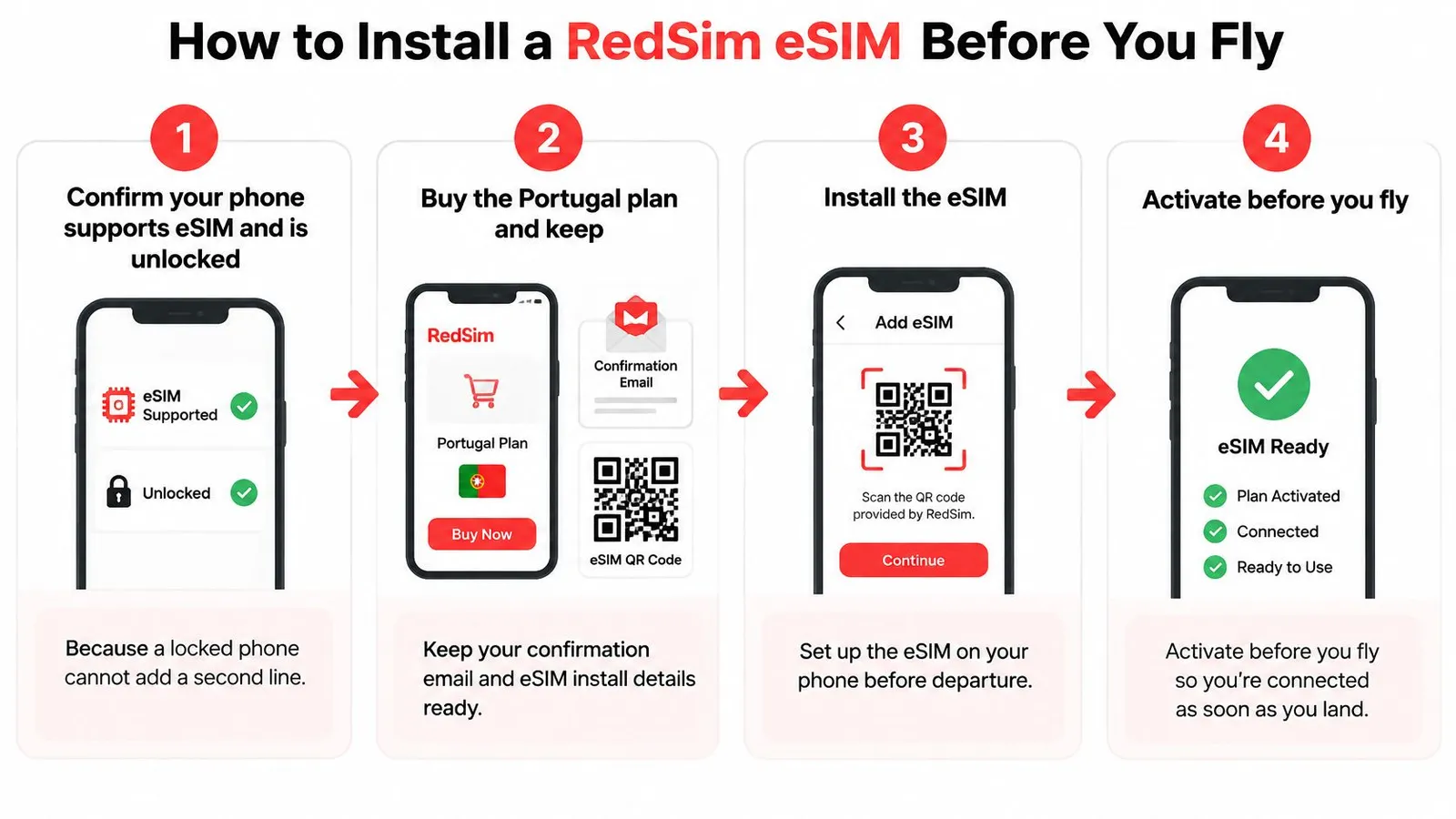
Install at home, not at the airport. Installation needs a stable connection, a readable QR code, and a few quiet minutes. Those are easier to find the day before departure than beside a baggage belt. Once the QR code is ready, the whole process usually takes about two minutes.
Install in this order
- Confirm compatibility and carrier restrictions: check the phone supports eSIM and isn't restricted to one carrier. A restricted phone can't add a second line, and discovering that after purchase wastes time.
- Buy and save the QR code: keep the delivery email somewhere it can be opened offline. Travel paperwork is easier to manage when flight records are also organized, including understanding airline ticket numbers before departure.
- Install from Settings or the app: on iPhone, open Cellular, then Add eSIM. On Android, open the SIM manager under Connections or Network. Compatible devices can use 1-click installation in the app instead of scanning.
- Label the new line Portugal: use a clear name and keep the home line switched on for calls and texts if it's still needed. Clear labels prevent the common mistake of sending data through the wrong line.
- Set the data line: select Portugal for cellular data and turn on data roaming for that line. Without roaming enabled on the travel line, it may not connect after landing.
- Check the displayed network: after activation, confirm the network name appears and test a webpage in a place with a clear signal. Don't judge reception from a basement, lift, or thick-walled room.
- Open the usage tracker: confirm the plan, remaining data display, and top-up option are visible. Doing this before departure makes the first check abroad routine rather than urgent.
The detailed setup guidance covers device-specific screens if a menu name differs. Read it while still on home Wi-Fi, especially when installing for a parent, partner, or colleague who isn't confident changing cellular settings.
One caution matters. Installing early isn't always the same as activating early, so check when the validity period begins during purchase. If the clock starts on installation, delay that step until closer to departure. If it starts on first network connection, installing at home is the safer choice.
Keep the home line available for banking codes and important calls, but don't leave it selected for data by accident. Before leaving for the airport, open the cellular settings once more and confirm three things, the Portugal line exists, it's selected for data, and roaming is on for that line only.
Fix Connection Problems After You Land
No signal or no data after landing is usually a settings problem, not a dead plan. Work through the checks in order and change one thing at a time. Random toggling makes the cause harder to find.
Use this order
- Check data roaming: confirm roaming is on for the Portugal line.
- Check the data line: make sure cellular data points to Portugal, not the home line.
- Restart the phone: switch it off and on so it registers again on the local network.
- Select the network manually: do this if the plan allows it and automatic selection hasn't produced usable data.
- Check hotspot settings: confirm the plan includes hotspot use and the phone's personal hotspot is switched on.
If signal bars appear but pages don't load, restart before changing more settings. If speeds are poor, move away from enclosed or underground spaces, check whether the phone shows 5G or 4G, and try again in a more open location. The connection still depends on the partner networks included in the agreement.
Fast data loss points to a different problem. Open the usage tracker and look for laptop updates, photo backup, cloud sync, or a tablet connected through the hotspot. Pause large sync jobs until hotel Wi-Fi is available, then top up if the remaining allowance won't cover the trip.
The dedicated help for no signal after landing covers cases that survive the basic checks. If those steps don't work, RedSim offers 24/7 support by WhatsApp and email, with typical WhatsApp replies in about two minutes. Send the phone model, selected data line, network name shown, and a screenshot of the cellular settings. That gives support something specific to diagnose.
For a Portugal-only trip that needs prepaid data on Vodafone or NOS, or a longer route that needs one profile across borders, choose the plan length and data tier that match the itinerary and install it before departure. RedSim offers instant QR delivery, in-app usage tracking, top-ups without a new QR code, and 24/7 WhatsApp and email support. Check compatibility, pick the closest plan, and land in Portugal ready to connect.

 Philippines
 China