
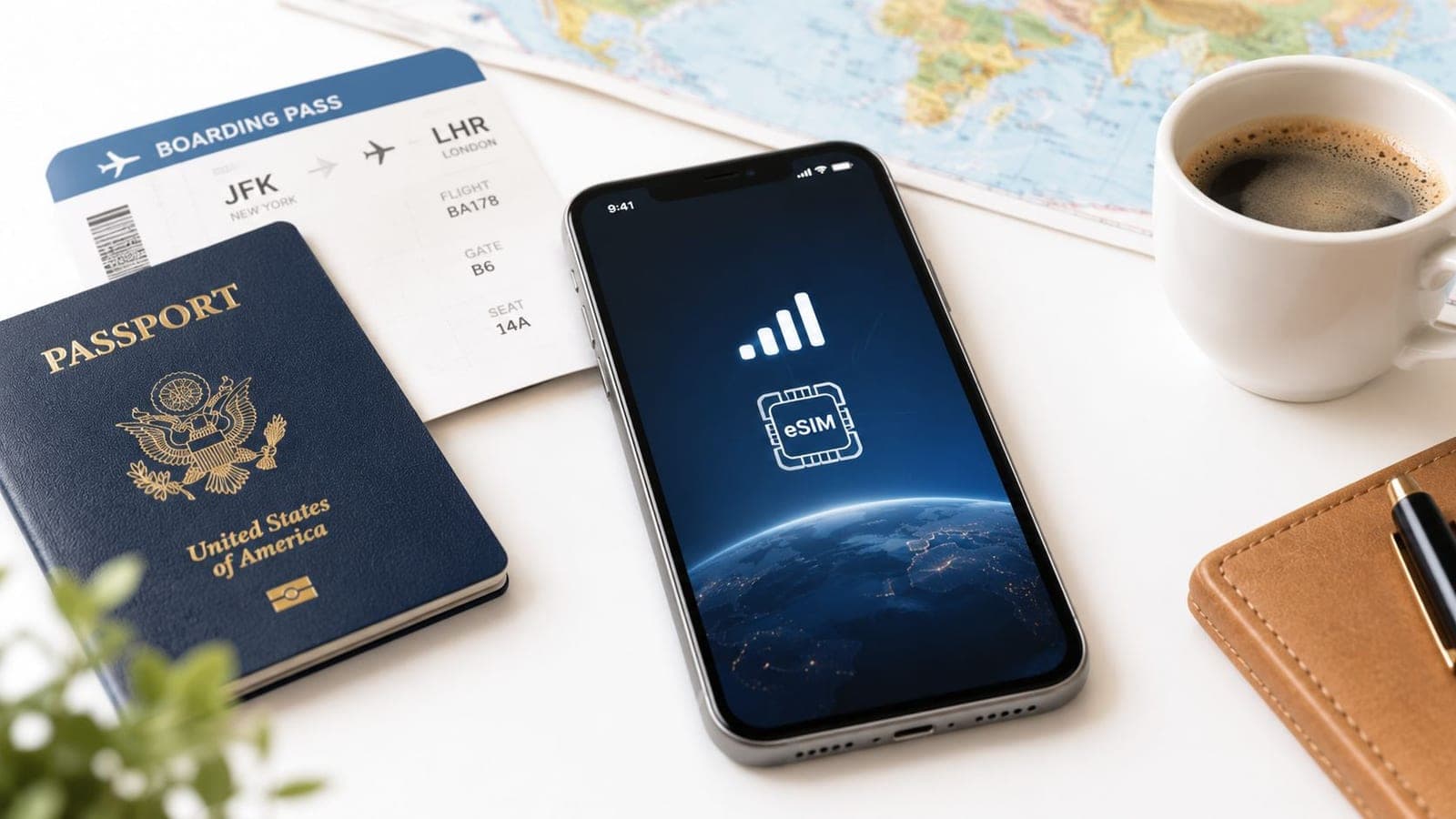
Data roaming is mobile data used on a network outside a home operator, usually through a partner network, and the charge can flow through a home carrier or a prepaid plan. Since 2007, EU roaming rules have cut roaming prices by more than 90% for calls, SMS, and data, but the setting still confuses first-time travelers because the cost depends on which SIM is active, not on the toggle alone.
The easiest way to think about it is this: a prepaid travel eSIM is like a coffee card you load before the trip, while the home SIM is the card your regular bank account keeps paying from in the background. If the wrong card is tapped, the bill follows that card, so the trick is knowing which line is carrying the data.
Data Roaming in Plain English
With a prepaid eSIM already installed, leaving Data Roaming ON is often the safe move, because that setting only allows the phone to connect. The danger is usually the home SIM, which can pull data in the background unless it's deliberately kept off for mobile data.
That's why what is data roaming is better understood as a permission switch than as a cost switch. The phone is asking, “May this line use a foreign network?” The bill depends on which line is allowed to send data and whether that line is prepaid, pass-through billed, or part of a bundle.
Think of it like a prepaid coffee card
A hotel barista can accept your coffee card even though you're far from home. The card works because the payment is recognized across locations, but only the card you tap gets charged.
Practical rule: for a travel eSIM, Data Roaming ON is usually the normal setting, while the home SIM should stay out of the data role unless the plan is meant for roaming charges.
That difference matters because the traveler's goal is not to ban roaming in every form. The goal is to control which line is doing the roaming, then keep the rest of the phone from using the wrong one. RedSim's eSIM overview fits that mental model well because it starts from a prepaid data bucket rather than a surprise bill.
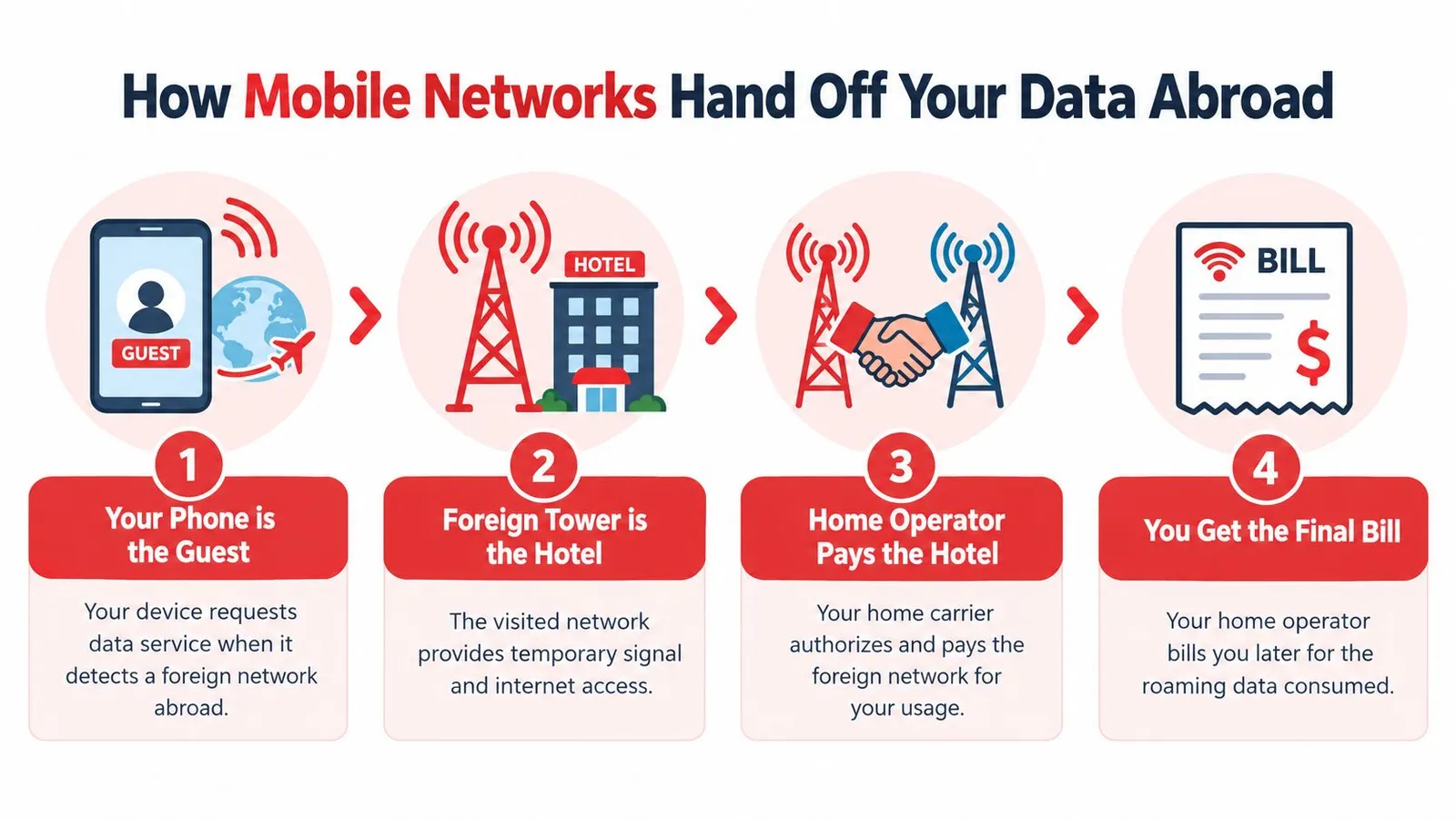
How Mobile Networks Hand Off Your Data Abroad
A roaming connection works a lot like a hotel key card. The phone is the guest, the foreign tower is the hotel front desk, and the home operator is the chain that authorizes the stay and sends the bill later.
Home-routed roaming and local breakout
In the common home-routed setup, the phone's session is anchored in the home network's core, and the traffic is tunnelled back there before reaching the internet. That keeps policy, charging, and subscriber context in one place, but it can also make the path longer and add latency.
With local breakout, the visited network sends data out locally, so only the control side has to reach back home. That is one reason some travel eSIMs feel quicker on maps, messaging, and browsing, even when the user hasn't changed any app settings.
Why a single megabyte gets so many hands on it
International roaming also relies on two layers at once, a commercial agreement and a technical connection. The commercial side defines wholesale settlement, while the technical side moves signaling and user data through roaming hubs such as GRX and IPX, so every megabyte passes through routing, authentication, and charging logic before the traveler ever sees the total.
The network path decides both the delay and the final price, which is why a phone can feel fast in one country and oddly sluggish in another even though the screen just says “connected.”
For a device compatibility check before departure, this device guide is the kind of thing travelers usually wish they had opened earlier.
Why Roaming Has Historically Been So Expensive
Roaming used to feel like a luxury service because the bill was built around scarcity. The European Commission's roaming framework once capped wholesale data roaming at €1 per megabyte, then lowered it to €0.80 from July 2010, while OECD analysis found average international mobile data roaming prices across OECD countries still ran about USD 6 to USD 10 per MB, and even the cheapest destination was around USD 2.5 per MB European Commission interim report.
The EU later pushed the market much harder. The European Parliament says roaming prices have fallen by more than 90% for calls, SMS, and data since the 2007 regulation, which is a clear sign that policy, not technology alone, reshaped the consumer experience EU roaming history.
Why the old model stayed expensive
The old system leaned on bilateral wholesale deals, partner-network scarcity, and pricing that most travelers never saw clearly. When one carrier controls the agreement in a country, competition is weak, settlement is opaque, and the customer ends up paying for a lot of invisible handoffs.
That's the origin of bill shock, the moment a traveler realizes that background syncing, map loads, or a few social posts were priced like premium goods. A prepaid travel eSIM changes the structure by selling a fixed data bucket in advance, so the traveler is no longer exposed to per-megabyte surprises in the same way.
| Roaming Price Evolution: From 2007 to Today | ||
|---|---|---|
| Year / Region | Avg. Retail Price per MB | Key Driver |
| 2007, EU roaming reform era | Not cited in the verified data | First regulation capped retail and wholesale roaming charges |
| 2010, EU and OECD market context | €0.80 wholesale cap in the EU, OECD average around USD 6 to USD 10 per MB | Wholesale controls, but retail roaming remained high in many markets |
| Since 2007, EU roaming market | More than 90% lower for calls, SMS, and data | Regulation and consumer pressure |
The Biggest Misconceptions Travelers Still Believe
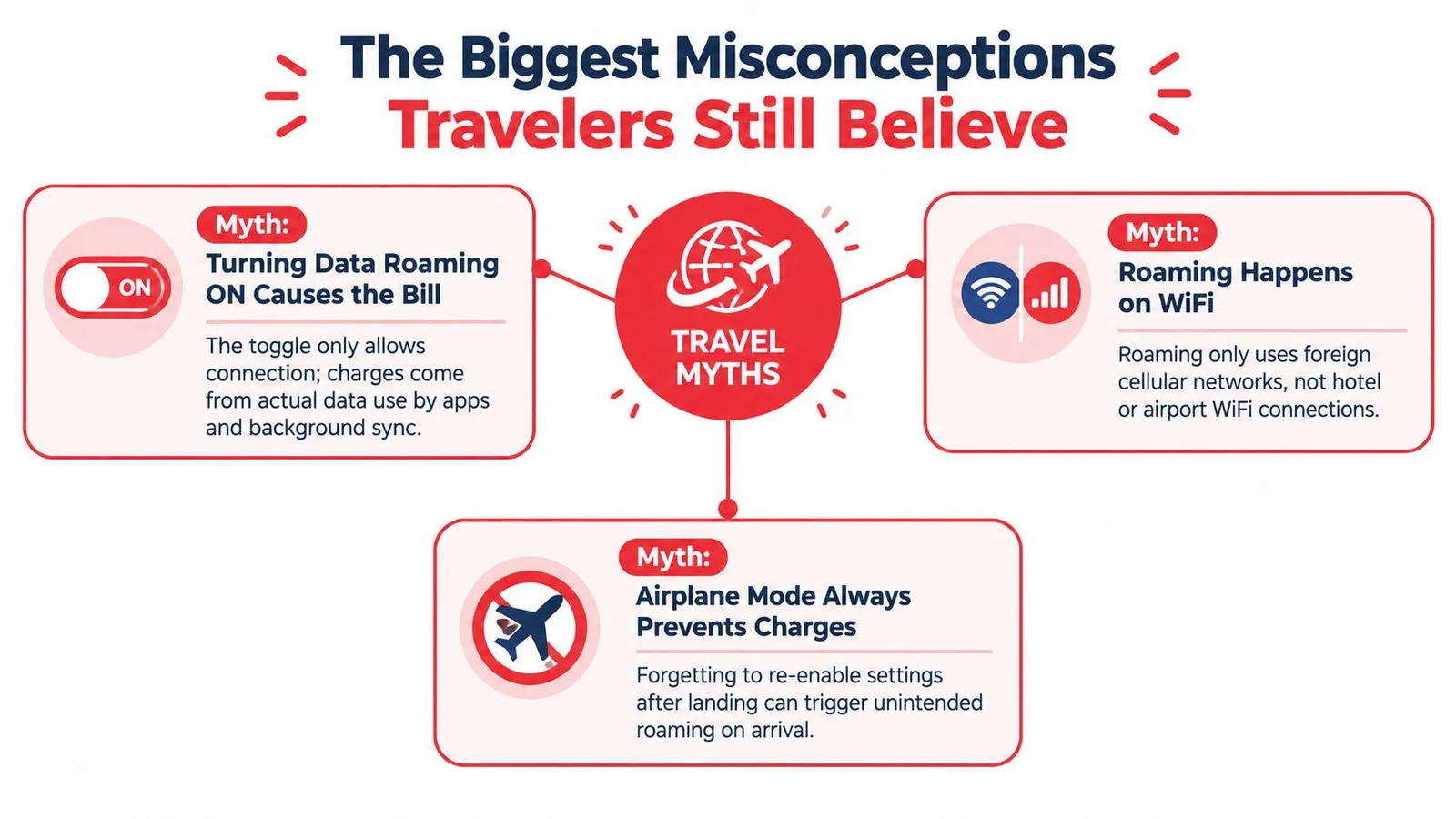
One common mistake is assuming turning Data Roaming ON causes the bill. The toggle only allows a connection, it doesn't decide whether the traveler is on a prepaid travel line or the home operator's data path. With a prepaid eSIM, roaming ON is often the correct choice because the spending is already bounded by the plan.
Three myths that keep causing confusion
Myth one, all roaming is ruinously expensive. That was much closer to the truth years ago, but the market has split. Some legacy home plans still sting, while prepaid travel data and EU-style rules have changed the picture for many trips.
Myth two, airplane mode solves everything. Airplane mode stops cellular connections, but it also blocks calls and texts until the traveler turns the right settings back on. It can be useful at takeoff and landing, but it isn't a permanent solution.
Myth three, roaming only matters for the “internet” app. Background sync, app refresh, and cloud updates can still move data in ways travelers don't notice. That's why the carrier policy and the selected data line matter more than airport-lounge folklore.
Setup help for eSIM activation is worth checking before the flight, especially when the device has more than one line.
Checking and Controlling Your Roaming Settings
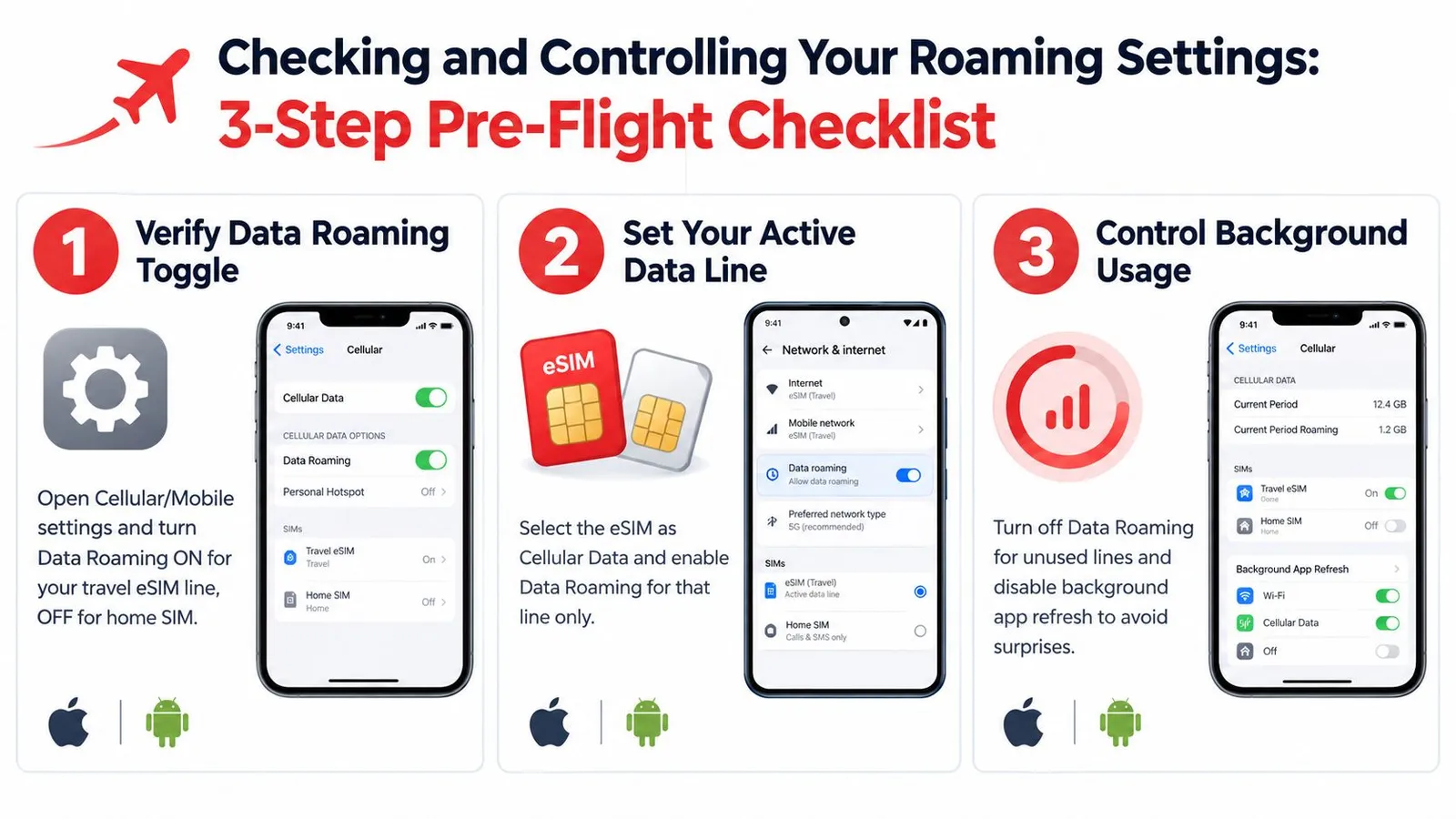
The safest pre-flight routine is simple: check the roaming toggle, pick the right data line, and keep the home SIM out of the data role. On many phones, the wording varies slightly, but the logic is the same on iPhone and Android.
Three settings that matter most
- Verify the Data Roaming toggle. Open Cellular or Mobile settings and make sure the travel eSIM line can roam, while the home SIM stays out of data use. On newer iPhones, the label may appear as Data Switching or a similar carrier-specific option.
- Choose the active data line. Select the travel eSIM as the default mobile data line so background apps do not burn the home plan by accident.
- Control background usage. Turn off cellular auto-updates and reduce cloud sync on mobile data so the phone doesn't spend your allowance without asking.
Good habit: test the eSIM on home Wi-Fi before departure, because activation, APN behavior, and data flow are much easier to confirm before the gate closes.
For travelers managing more than one profile, this eSIM management guide helps keep the right line active without guesswork.
Choosing the Right Way to Stay Connected
The right choice depends on trip length, country count, and how much hassle the traveler is willing to manage. A short business trip and a six-country holiday don't need the same setup.
Compare the four common options
| Option | Typical Cost | Convenience | Coverage | Best For |
|---|---|---|---|---|
| Home carrier daily pass | Often expensive relative to prepaid travel data | Easy to turn on | Depends on partner networks | Short trips where the home number must stay primary |
| Local physical SIM | Often cheaper per unit of data | Less convenient, needs a store visit | Strong in one country | Long stays in one destination |
| Travel eSIM | Prepaid and predictable | Very convenient, installs digitally | Can be country-specific or regional | Multi-country trips and frequent flyers |
| Wi-Fi only | No cellular data cost | Limited outside hotels and cafés | Unreliable on the move | Very light usage and backup access |
A travel eSIM is usually the cleanest fit for trips that cross borders or need quick setup before departure. A local physical SIM still makes sense for longer stays in one country, and a home carrier pass can work when keeping the home number primary matters more than cost control.
RedSim's global eSIM option is one example of a prepaid travel data setup that keeps the home SIM available for calls and SMS while the data line stays separate. That separation is what removes most of the roaming confusion in practice.
Installing and Using a Travel eSIM Step by Step
The easiest eSIM workflow starts before the flight, not after landing. Pick a country-specific or regional plan based on the itinerary, then install it while still on reliable Wi-Fi so there's no rush at the airport.
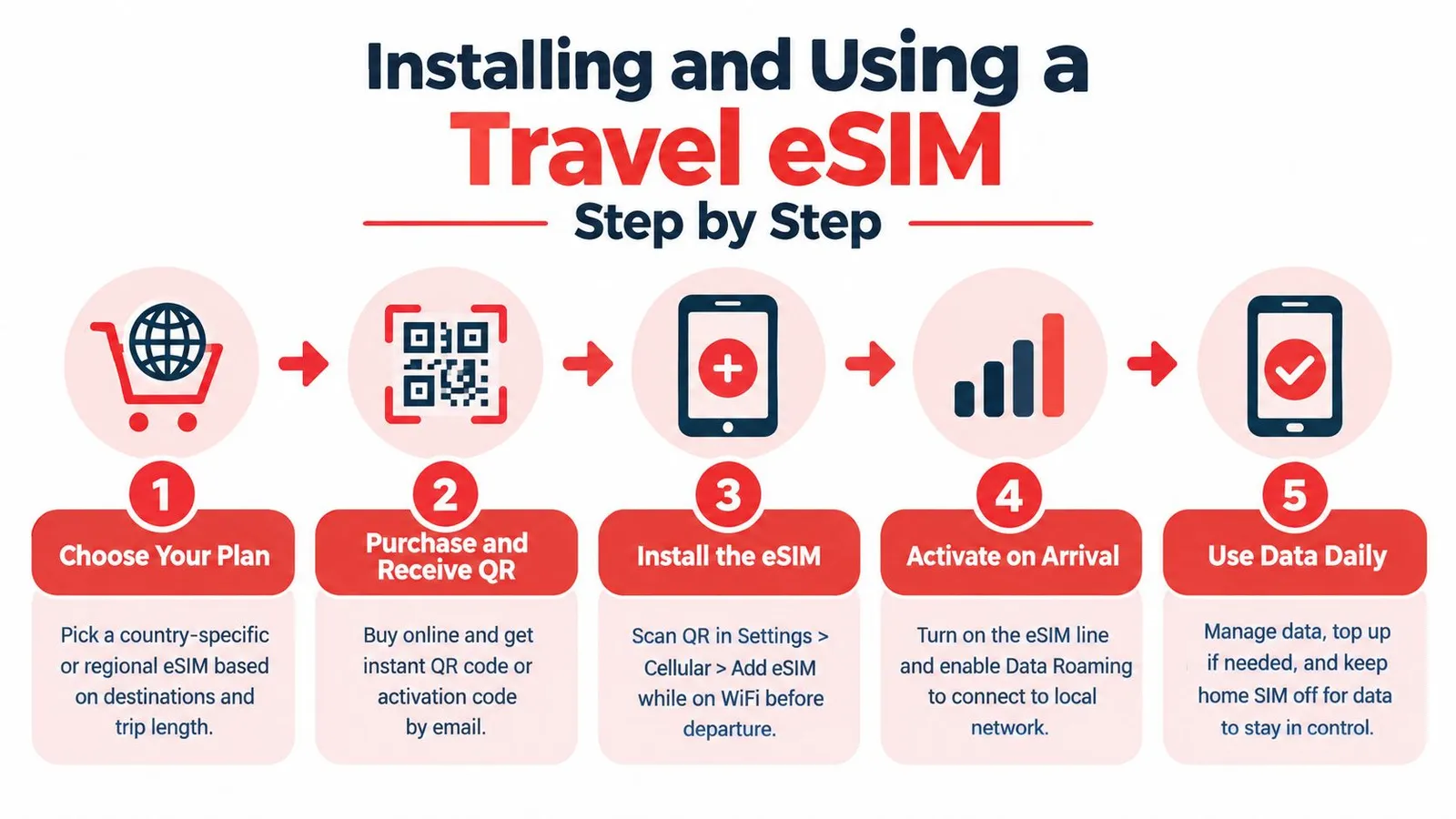
A simple install path
- Choose the plan. A single-country trip needs a different profile than a border-hopping itinerary.
- Receive the QR code or install link. Instant delivery means the setup can happen before departure.
- Install on the device. On supported phones, one-tap install can skip manual code entry.
- Activate on landing. Turn on the travel eSIM line and allow it to join the visited network.
- Track usage daily. Watch the data balance and top up before the line runs dry.
The main RedSim features that matter here are instant QR delivery, one-tap install on iOS and Android, regional bundles that can span borders without reconfiguration, and top-ups on active eSIMs without issuing a new QR code. Unused, unactivated eSIMs are refundable, which lowers the risk of buying too early.
There's also a practical fallback for weird travel days. If a profile refuses to activate mid-journey, 24/7 support can help sort out the device side, while the home SIM stays available for calls and SMS.
A Simple Pre-Departure Roaming Playbook
The safest travel habit is boring in the best way. Install the eSIM before departure, keep the home SIM out of mobile data, and let Wi-Fi handle heavy jobs like map downloads and photo backups.
Flip to airplane mode right after landing if the device needs a clean start, then re-enable only the settings that belong to the travel line. Keep a backup path for SMS verification, because banks and airlines still lean on text codes more often than travelers expect.
A good checklist is short: device, eSIM profile installed and tested, top-up credit ready, support contact saved offline, and offline maps downloaded. That combination removes most of the historic risk and turns roaming into a routine travel task instead of a guessing game.
RedSim offers prepaid travel eSIMs for country, regional, and global trips, with instant QR delivery, one-click installation, top-ups, and round-the-clock support. For a first trip abroad or a multi-country itinerary, RedSim gives travelers a straightforward way to keep the home SIM for calls and SMS while the data line stays under control.

 Portugal
 Philippines
 China
China